SkipTube is free to watch with no ads. Pro is one payment of $4.99, with no subscription, and it adds the extras.
Short answer
Pro costs $4.99 once. It adds background play, Picture in Picture, sponsor skip, the queue, the sleep timer, audio only, speed, marking sponsors and the Safari extension.
SkipTube is for iPhone.
What is free
Watching with no ads is free. You do not need an account to watch.
- Videos with no ads, and no ads in the app.
- Home, Search, channels, Subscriptions and Library.
- Captions.
- The like count and the dislike estimate.
- The Shorts setting.
- The clean player: end screens, cards, comments and autoplay.
- Focus mode and blocked channels.
- The sponsor marks on the bar of a video.
With a SkipTube account, these are free too: saving videos, following channels, voting and your history.
What Pro adds
- Background play, so the video keeps playing with the screen off.
- Picture in Picture.
- Sponsor skip, and marking a sponsor.
- The queue, which follows you to your other phones.
- The sleep timer.
- Audio only.
- Speed, and a speed for each channel.
- The Safari extension.
- Where you stopped in a video, on your other devices.
On the free plan, a Pro button is marked and opens a panel that says what Pro adds. Nothing breaks. You can close the panel and carry on.
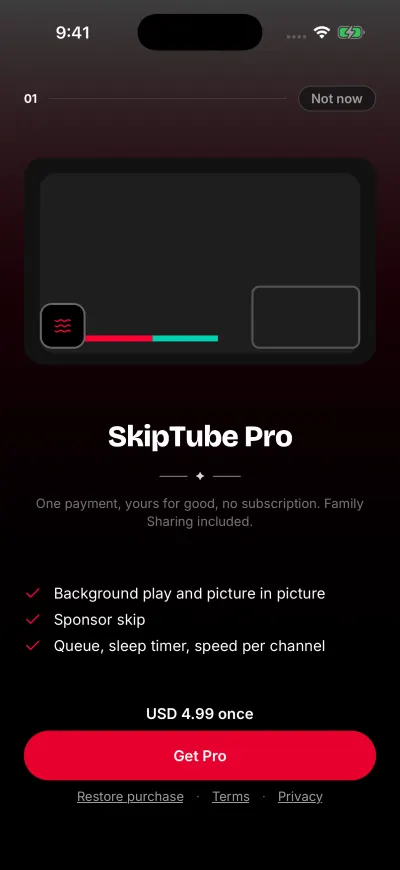
One payment. No subscription.
The price
Pro costs $4.99, once. The store shows the price in your own money. There is no trial, no subscription and nothing to cancel. The Pro screen says: One payment, yours for good, no subscription. Family Sharing included.
Pro stays with your account
Pro needs a SkipTube account and stays with it.
- When you buy, SkipTube asks you to sign in first. It says Sign in to get Pro. It stays with your account.
- On a new phone, sign in to the same account. Pro comes back with no purchase. See Restore your purchase.
- When you are signed out, SkipTube is on the free plan. This is true even on the phone that bought Pro.
Which plan am I on
- Tap Settings at the bottom of the screen.
- Tap the card at the top. The Accounts sheet opens.
- On the SkipTube account row, a label shows your plan.
- Pro, with the line Pro is yours for good. One purchase, nothing to cancel.
- Free plan
- Status unavailable, when SkipTube cannot check. See SkipTube cannot check your plan.
On the free plan, Settings also has a banner, Get SkipTube Pro. Tap it to open the Pro screen.
When the Pro panel opens by itself
A Pro panel can open on its own, for example when you come back to a paused video. It opens at most once each time you open SkipTube, and at most three times in 7 days. If you tap Not now twice in a row, it stops for a week. After you buy Pro, these panels stop for good. When you tap a Pro button yourself, the panel always opens.
To get Pro, see Get SkipTube Pro.