The extension brings SkipTube's no-ads watching to YouTube in Safari. It is part of Pro. You turn it on in iPhone Settings.
Short answer
In SkipTube, tap Settings, then Safari extension, then Open Safari settings. In iPhone Settings, turn on SkipTube and allow it on youtube.com.
SkipTube is for iPhone.
What it does
The screen says: Watch in Safari with the same rules as the app: no ads, the filters and PiP. Part of Pro.
The extension works in Safari on youtube.com, on m.youtube.com and on www.youtube.com. It does not work on other sites. It works only while your SkipTube account has Pro.
Open the setup screen
- Tap Settings at the bottom of SkipTube.
- Under Pro, tap Safari extension.
- The SkipTube in Safari screen opens.
On the free plan, a tap on that row opens the Pro panel instead. See Get SkipTube Pro.
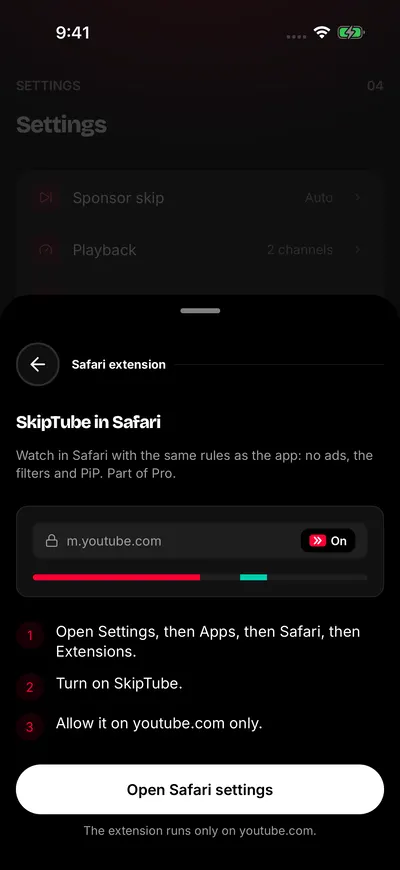
Three steps to turn on the extension.
Turn it on
SkipTube cannot turn the extension on for you. You do it in the iPhone Settings app. SkipTube shows the same steps on its screen:
- Open Settings, then Apps, then Safari, then Extensions.
- Turn on SkipTube.
- Allow it on youtube.com only.
Tap Open Safari settings to go to Safari's page in iPhone Settings. If your iPhone does not open it, SkipTube opens its own page in iPhone Settings. Then follow the steps from there.
The screen has a small picture of Safari with the word On. It shows what you will see in Safari's address bar.
For Apple's own help, see Safari extensions in the iPhone User Guide.
See if it works
Open youtube.com in Safari while you have Pro. When you come back to SkipTube, the setup screen says Working in Safari, with a tick, if Safari used the extension in the last 7 days.
If that line is missing, the extension is not necessarily off. SkipTube cannot ask Safari. The line only shows after a visit to youtube.com in the last 7 days.
Good to know
The extension runs only on youtube.com.
- It brings no ads, Picture in Picture and the filters in Safari.
- It uses SkipTube's default settings, not yours. The extension cannot read your settings. The defaults hide end screens and cards, and they show Shorts and comments.
- Its rules update at most every 6 hours.
If it does not work, see The Safari extension is not working.