Pro is one payment of $4.99. Tap Get Pro, then follow Apple's payment screen.
Short answer
Tap a Pro button, or tap Get SkipTube Pro in Settings. Then tap Get Pro and follow Apple's screen.
SkipTube is for iPhone.
Open the Pro screen
You can get to it in three ways.
- Tap any Pro button, such as the queue button under a video. A panel opens that says what Pro adds.
- Tap Settings, then the banner Get SkipTube Pro. A full screen opens.
- Create a SkipTube account on the free plan. The last step of the setup is the Pro screen, shown once. It has Continue for free to go on without paying.
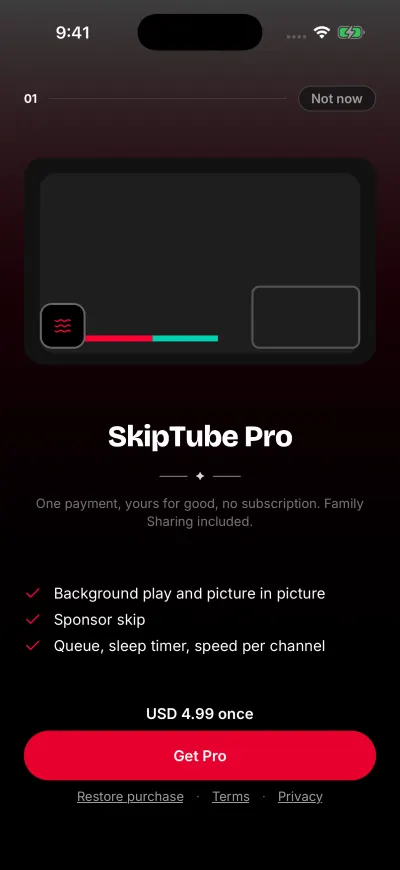
The full screen is titled SkipTube Pro and says: One payment, yours for good, no subscription. Family Sharing included. Under it are three lines about what Pro adds: Background play and picture in picture, Sponsor skip and Queue, sleep timer, speed per channel.
One payment. No subscription.
Buy Pro
- If SkipTube asks you to sign in, sign in. It says Sign in to get Pro. It stays with your account. Pro stays with your account.
- Look at the price above the big button. It says the price with the word once, as in … once.
- Tap Get Pro.
- Apple's payment screen opens. Follow it.
- When Apple has taken the payment, Pro is on. The panel closes. What you wanted to do, such as skipping a sponsor, goes ahead.
Pro is one payment. There is no trial and no subscription, and nothing to cancel.
If you do not want to pay now
On a panel, tap Not now, or the close button. On the full screen, tap Continue for free. Nothing is charged.
If your account already has Pro
The big button says Continue. Nothing is charged. SkipTube never asks you to pay a second time for the same account.
If the price does not load
The screen can say Pro is not available right now with Check your connection and try again. Tap Try again. See Pro is not available right now.
If something goes wrong
Find your case below.
- Apple took the payment but Pro is not on yet: Finish the activation of Pro.
- The purchase did not start: Could not start purchase.
- You bought Pro before and it is not here: Restore your purchase.
- You want your money back: Ask Apple for a refund.
Under the big button, there are also Restore purchase, Terms and Privacy.