Background play is part of SkipTube Pro. On the free plan, a video pauses when you leave the app, and SkipTube keeps the time.
Short answer
With Pro, the video keeps playing when you lock your iPhone or open another app. On the free plan, it pauses when you leave SkipTube.
SkipTube is for iPhone.
What it is
Background play means the video, or its sound, keeps going when SkipTube is not on the screen. You lock your iPhone. You press the side button. You open another app. The sound carries on.
Background play is part of Pro. It is one payment of $4.99, with no subscription. The price in the store may be shown in your own money. See Free and Pro.
On the free plan
When you lock the phone or leave SkipTube while a video plays, the video pauses. SkipTube keeps the time, so you carry on from the same second. Nothing is lost.
When you come back to SkipTube, a panel can open. It says Keep it playing with the screen off It also says the time, as in Paused at … when you left the app.
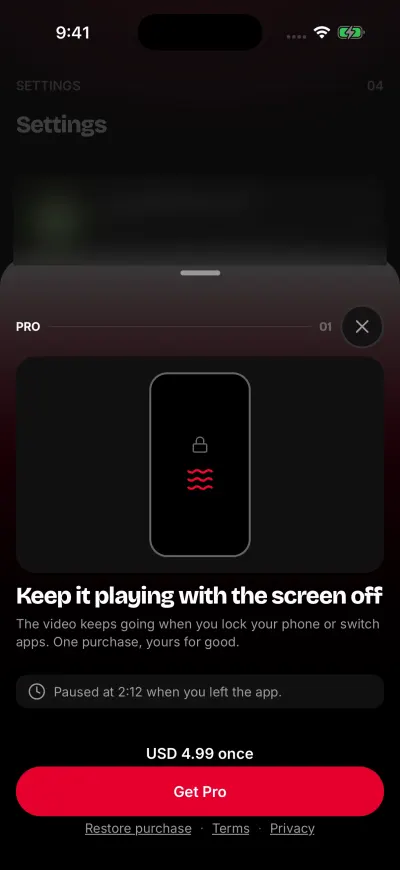
On the free plan, the video pauses when you leave the app.
You have two choices.
- Tap the button to get Pro. The video starts again from where it paused.
- Tap Not now. The panel closes and the video stays paused. Tap play to carry on.
This panel does not show every time. It shows at most once each time you open SkipTube, and at most three times in 7 days. If you tap Not now twice in a row, it stops for a week. If you tap a Pro button yourself, the panel always opens.
With Pro
The video keeps playing when you lock your iPhone, switch apps or go to the Home Screen. You do not need to start anything. Pro also lets you use Picture in Picture, the queue, the sleep timer and Audio only.
Pro needs a SkipTube account and stays with it. If you are signed out, SkipTube is on the free plan, even on a phone that bought Pro. Sign in to get it back. See Sign in to SkipTube.
Controls on the lock screen
With Pro, the video keeps playing, and you can pause it from your iPhone's own screens. These are Apple's, not SkipTube's.
- On the Lock Screen, the playback controls show play, pause and next.
- In Control Center, the same controls show in the media card.
- Headphones with a button can play, pause and skip.
Next plays the next video in your queue. See Lock screen and headphone controls. For how to open Control Center, see Apple's iPhone User Guide.