If a sponsor is not marked, you can mark it. Everyone who watches the video next can then skip it.
Short answer
Under the video, tap Sponsor. Tap Set to now at the start and again at the end, then tap Send.
SkipTube is for iPhone.
Before you start
Marking a sponsor is part of Pro. You also need a SkipTube account, because the report goes to SkipTube's server. If you are signed out, SkipTube asks you to sign in when you tap Send. It says Sign in to report sponsors. Your report goes after you sign in.
A live video has no Sponsor button.
Mark it
- Open the video and play it.
- In the row of buttons under the video, find Sponsor. It is the last button in the row. Tap it.
- A sheet opens with the video at the top. Under it, a bar shows a part of the video around where you are. The time shows under the bar, as in Playing …
- Move to where the sponsor starts. Let the video play, or press on the bar to go to that place.
- Under Start, tap Set to now. The time of the video is put there.
- Move to where the sponsor ends. Under End, tap Set to now.
- Under What is it?, pick the kind: Sponsor read, Self-promotion or "Like and subscribe" reminder.
- Tap Send.
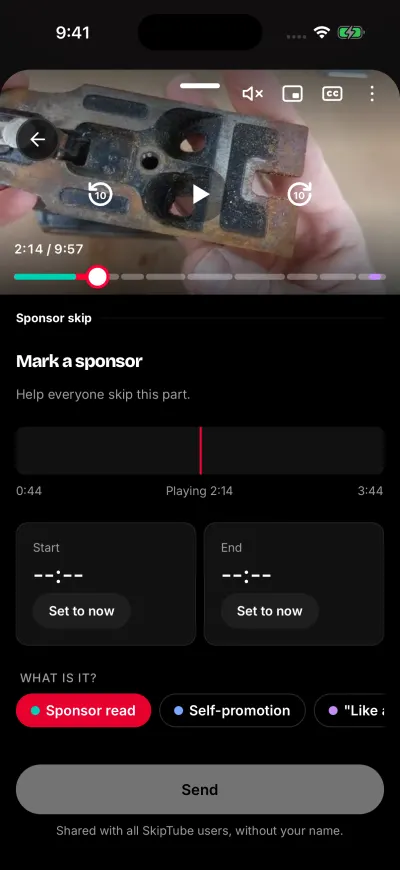
Set where the sponsor starts and ends.
The sheet shows Help everyone skip this part. A message says Thanks. Your report was sent. and the sheet closes.
If you tap Set to now on the wrong second, tap it again. The new time replaces the old one.
When Send is grey
Send stays grey until the part is a real one.
- Both Start and End must have a time. An empty one shows --:--.
- The end must come after the start.
- The part can last 10 minutes at most.
- The end must be inside the video.
Who sees it
Your report is shared without your name. The sheet says: Shared with all SkipTube users, without your name. SkipTube also keeps it with your account on its server until you delete the account.
A report does not turn on a skip by itself. SkipTube marks a part only when there is enough proof.
Too many reports
You can send 20 reports an hour. After that, the sheet says Too many reports. Try again in an hour. Your times stay on the sheet. See SkipTube could not send your report.
A skip that was wrong
That is a different sheet. See SkipTube skipped something that was not a sponsor.