They are separate. The YouTube account brings your feed. The SkipTube account keeps your saves and settings.
Short answer
Open Settings, then tap the card at the top. You see both accounts, each with its own sign-in and sign-out.
SkipTube is for iPhone.
Two accounts, two jobs
SkipTube shows Your YouTube account and your SkipTube account are separate.
- The YouTube account is the one you use on YouTube. It brings your own feed, your subscriptions and your lists into SkipTube.
- The SkipTube account is made by SkipTube. It keeps what you save in SkipTube, and your settings, on every phone you sign in on.
You can have one, both, or none. SkipTube works with none.
Where to find them
- Tap Settings at the bottom of the screen.
- Tap the card at the top. It shows your name, your plan, and a line about YouTube. You can also tap the round profile button at the top right of Home.
- The Accounts sheet opens.
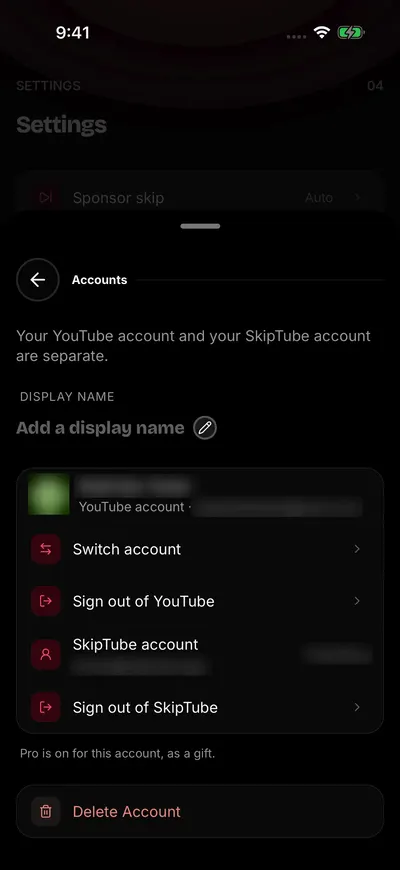
Your two accounts are separate.
The sheet has, from top to bottom:
- Display name, when you are signed in to SkipTube.
- The YouTube account. Signed in, it shows your name and your email, with Switch account and Sign out of YouTube. Signed out, it has Sign in.
- The SkipTube account, called SkipTube account. Signed in, it shows your email and your plan, with Sign out of SkipTube. Signed out, it has Sign in.
- Delete Account, in red at the bottom, when you are signed in to SkipTube.
What signing in to YouTube adds
Without it, Home's For you row only invites you to search or sign in. With it:
- For you shows your recommendations.
- Subscriptions shows your YouTube subscriptions and their new videos.
- Library shows your YouTube History, Watch Later, Playlists and Liked.
- Under a video, Save becomes Watch later. Press and hold it to pick a playlist.
- Likes and subscribing go on your YouTube account.
- Not interested is sent to YouTube.
Signing in is Google's own page. SkipTube never sees your password. See Sign in to YouTube.
Two questions SkipTube may ask
SkipTube asks two things, so that your YouTube account and your follows agree.
Subscribing from a video. Signed out of YouTube, tap Subscribe under a video. A panel opens, called Subscribe on your account? It says that if you sign in to YouTube, the channel joins your real subscriptions, on every device. It has three buttons: Sign in to YouTube, Follow in SkipTube only and Not now. Follow in SkipTube only follows the channel inside SkipTube only, and needs a SkipTube account.
Channels you already follow. Say you follow channels in SkipTube, then sign in to YouTube. The Subscriptions tab may show a card. It says how many channels you follow in SkipTube, and asks to subscribe to the ones that are new to your YouTube account. It has three buttons: one that subscribes to all the new ones, Choose and Not now. Choose opens Choose channels, where each channel has a tick. SkipTube asks once on each phone, and any answer ends the question. Your SkipTube follows are not changed.
If a subscribe does not go through, a box says Could not update your subscription. Try again. If only some channels went through, it says how many worked out of the total. The others stay as they were. Try again later, from the video.
What the SkipTube account keeps
When you sign in to your SkipTube account on a phone, that phone gets:
- The videos you saved, and the channels you follow.
- Your history, with where you stopped in each video. SkipTube saves your place every 15 seconds while a video plays.
- Your votes.
- Every setting: Shorts, the clean player, Focus mode, blocked channels, sponsor skip, speed for each channel, audio only by default and the sleep timer.
- With Pro: your queue, and where you stopped on other devices.
SkipTube Pro belongs to the SkipTube account, not to the phone. Sign in to the same account on a new phone and Pro comes back.
Settings you changed while signed out stay on the phone. When you sign in, they go to your account if it has no saved settings. If it has some, the account keeps its own.
What stays on this phone
Four things never leave the phone: your recent searches, the app language, the fact that you saw the welcome and the tour, and a count for a weekly note.
When you are signed out
Signed out of SkipTube, the card at the top of Settings says Not signed in. These all work with no account:
- Videos with no ads.
- Home, Search, channels, Subscriptions and Library.
- Captions, and the like count.
- The Shorts setting, the clean player, Focus mode and blocked channels.
You only need a SkipTube account to save, follow, vote, mark a sponsor, buy Pro or restore a purchase. SkipTube asks you to sign in at that moment, and says why. Nothing else sends you to the sign-in.
Signed out, SkipTube is always on the free plan, even on a phone that bought Pro.
Switch the YouTube account
You can use another YouTube account, or add one, from Google's list.
- Open Settings, tap the card at the top, and find the YouTube account.
- Tap Switch account. Google's list opens full screen, with the accounts on your phone.
- Pick an account, or tap Google's button to use another one.
- When you reach YouTube, the page closes by itself. The sheet shows the new account.
To close the page without changing anything, tap Close.