Under a video, Save works in one tap. Press and hold it to pick a playlist. What it does depends on your account.
Short answer
Under the video, tap Watch later. To pick a playlist, press and hold it, then tick the list.
SkipTube is for iPhone.
One tap to save
The button under the video does different things for different accounts.
- Signed in to YouTube: it says Watch later. One tap adds the video to your YouTube Watch Later. Tap it again to take it out.
- Not signed in to YouTube: it says Save. One tap saves the video in SkipTube. For that you need a SkipTube account, and SkipTube asks you to sign in. When it is done, the button says Saved.
The same save is in the video's menu, under Save to Watch later. See The video menu.
Pick a playlist
This is for people signed in to YouTube.
- Under the video, press and hold Watch later. The Save to panel opens.
- Each row is a list: Watch later, then your playlists. A tick means the video is in that list.
- Tap a row to add the video or take it out.
- Tap Done at the bottom.
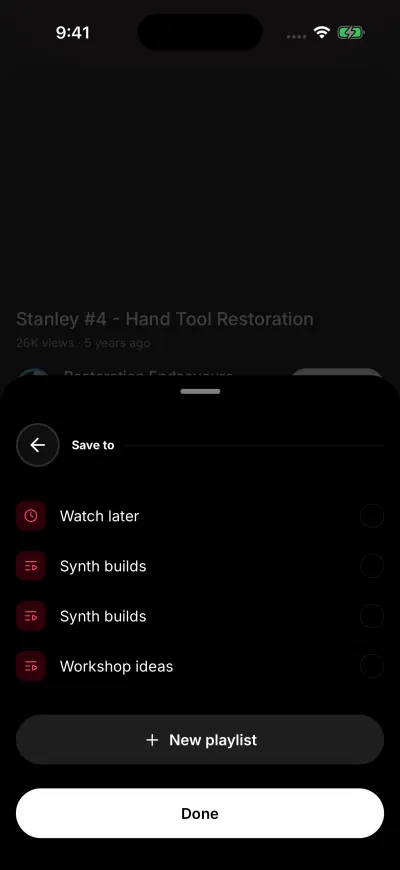
Tick a list to save the video in it.
Each tap changes the list at once. Done only closes the panel. The rows dim for a moment while a change goes through. Wait for them to light up before the next tap.
You can also open this panel from the video's menu, with Save to playlist. If you are not signed in to YouTube, that row opens the YouTube sign-in instead.
Make a new playlist
- In the Save to panel, tap New playlist under the rows.
- Type a name in the box that says Playlist name. A name can have up to 150 letters.
- Tap Create.
The playlist is made with this video already in it. The Create button stays grey until you type a name. You see the new playlist under Playlists in your Library. See Your Library.
If it does not work
A panel that says Could not load your playlists could not read your playlists. Tap Try again. A box that says Could not update your account. Try again. means the change did not reach your account. Nothing was changed. See Could not update your account.