Home is today, or the last 24 hours, for the baby shown at the top. Other days are in the week.
Short answer
Home shows today, or the last 24 hours if you choose it. The round counters say how long since the last feed, nappy and sleep. Each card has a + to log, and its newest entries under it.
Veilleuse is for iPhone.
The top
At the top you see Home and today’s date. Under it, a card with your baby’s picture, name and age. The age shows in weeks up to 12 weeks, then in months, then in years and months.
Tap the card to open your baby’s page. With more than one baby, a small Switch baby button on that page lets you choose another baby.
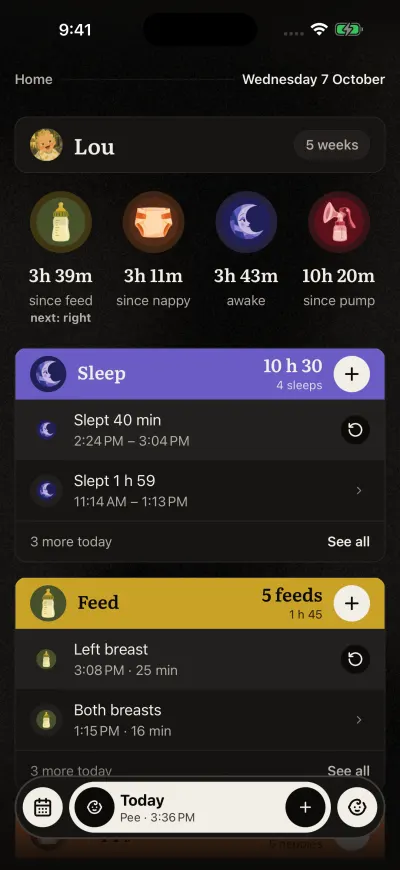
Home. The bar at the bottom stays on every screen.
Today or the last 24 hours
Under your baby, two buttons choose what the cards show:
- Today: from midnight until now.
- Last 24 h: the 24 hours up to now, so a feed at 11 PM still shows in the morning.
Your choice is kept on this phone. An entry from the day before says its day in its time line.
The round counters
Then round counters show the time since the last moment:
- since feed, with next: left or next: right after a breastfeed.
- since nappy.
- awake, or asleep while a sleep runs.
- since pump, once you log pumping.
2d+ means nothing was logged today or yesterday. Tap a counter to log that kind of moment.
Her usual day
Under the band of each card, circles and a big time show her usual day and what comes next, such as next nap or next milk. It comes from your baby's own last 7 days, and it is part of the Family plan. See Her usual day, on every card.
The cards
Then come the cards, one for each kind: Sleep, Feed, Nappy, Pumping, Bath, Tooth brushing, Growth and Medication. Scroll down to see them all.
- The coloured band at the top of a card shows the total for Today or the last 24 hours. For tooth brushing, it is the number alone. The + on it logs a new one.
- Under the band: her usual day, then the two newest entries. Tap one to change it or delete it.
- See all shows the rest. Show less folds them again.
- A sleep, a feed or pumping that runs shows at the top of its card, with its time and a stop button. Under it, Fell asleep earlier? or Started earlier? puts its start right.
- Resume it next to the last one starts it again, if it stopped too soon. For an hour after a stop, Woke up earlier? or Finished earlier? under it puts its end right.
- Growth and Medication show the newest entry, with its date.
A card with nothing yet says Nothing logged yet. That is normal at the start of a day.
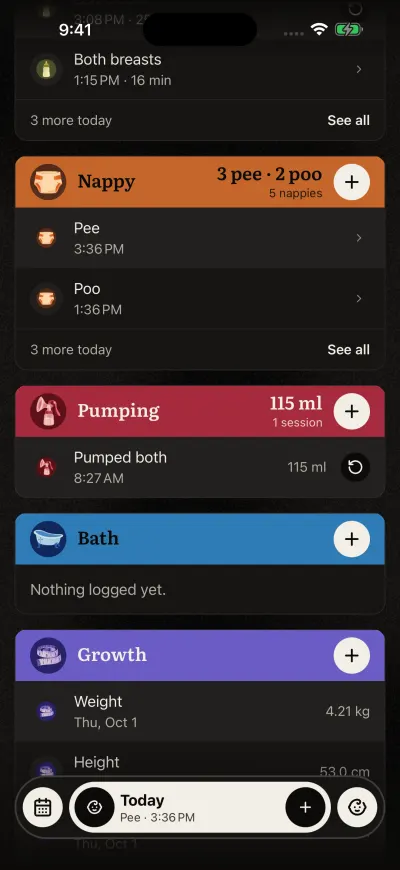
Each card has its + on the right. An empty card is normal at the start of a day.
The bar at the bottom
The bar is always there. See the bar at the bottom, button by button.
No baby on Home
If Home says Add a baby to start tracking., the family has no baby right now. Tap Add a baby, then fill in the name and the birth date.
On the Free plan, if your family has a baby you cannot log, a line under the baby card says so. Tap it to see the Family plan.