The bar is the whole navigation. It stays at the bottom of Home, the baby screen and the guides. Slide it to see its second side.
Short answer
From left to right: the calendar opens Week, the middle opens today, the + logs a moment, and the last square opens Baby. On the baby screen, that square becomes Settings. Slide the bar to the left for Guides and Ask.
Veilleuse is for iPhone.
From left to right
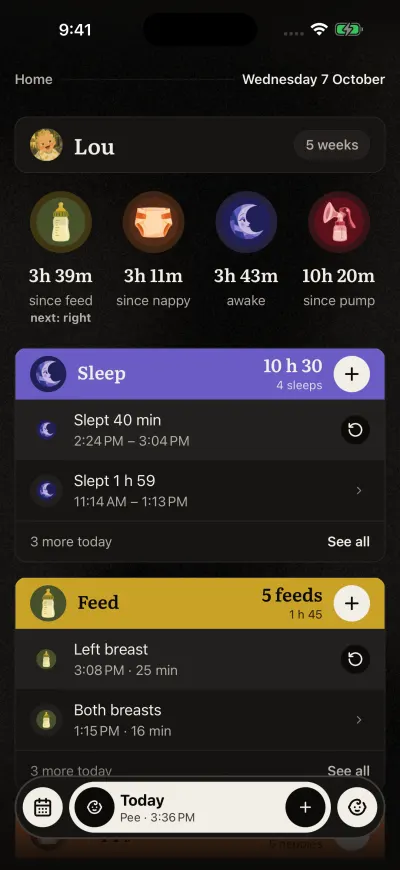
Home. The bar at the bottom stays on every screen.
- The calendar square: opens Week, with every day of the week.
- The middle: it says Today, with your newest entry of today and its time. Tap it to come back to Home. With nothing logged today, it says Nothing logged yet
- The round + button: Log a moment. It opens the page where you say or type what happened.
- The last square: opens Baby, your baby’s page.
The second side
The bar has a second side. Put your finger on the bar and slide it to the left.
- Guides, in place of the calendar: opens the guides in the app. See Read the guides in the app.
- Ask, in the middle: About babies. It opens Claire. See Ask Claire about babies.
The + and the last square stay in their place. Slide the bar to the right to come back. The bar always opens on its first side.
Where Settings is
Tap Baby first. On the baby screen, the last square of the bar becomes Settings, with a gear. Tap it.
While something runs
When a sleep, a feed or pumping runs, the middle of the bar shows it: Asleep, Feeding or Pumping, with the time so far. At its start, the small round icon becomes a stop button in the same colour. Tap it to stop.
The + stays the same. You can still log something else while a timer runs.
The small locks
On the Free plan, the calendar square, the + and Ask wear a small lock. They are part of the Family plan. A tap opens the plans screen. To log by hand, use the + on the Home cards: it is free. See What is free, and what the Family plan adds.