
Three things run with a timer: a sleep, a breastfeed and pumping. You start it once, and stop it from anywhere.
Short answer
Start: on Home, tap the + on the card, answer the first page and tap Next, then Start now. Stop: tap the square stop button at the left of the bar at the bottom, or the one in the card. The lock screen has one too.
Veilleuse is for iPhone.
Start a timer
- On Home, find the card: Sleep, Feed or Pumping.
- Tap the round + on the right of its band.
- For a feed, tap Breast, then Next, then a side and Next. For pumping, tap a side, then Next.
- The page asks if it runs now. The first answer is ticked. Tap Next.
- The page asks when it started. Just now is ticked. Tap Start now.
For a start a few minutes ago, tap that time first: the button then shows that time, and the timer counts from it.
The timer starts. You can lock your phone: it keeps counting. Only a breastfeed has a timer. A bottle and solids are saved as one moment, like a bath or tooth brushing.
Timers are free on every plan.
While it runs
- In its card on Home, a coloured line says, for example, Asleep and how long.
- The bar at the bottom of the screen shows it too, with a square stop button on its left.
- Your lock screen shows it. See The timer on your lock screen.
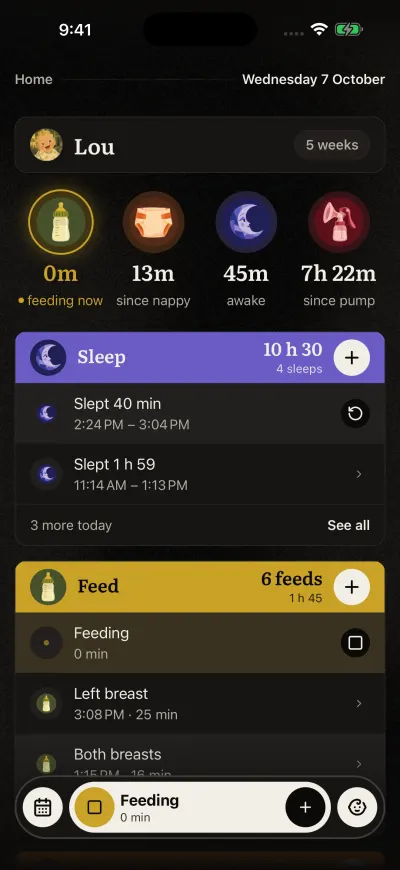
A timer is running. The square in the bar stops it.
Started earlier?
You started the timer late, or forgot it? On Home, under the running row, tap Fell asleep earlier? for a sleep, or Started earlier? for a feed or pumping.
- The page asks when it started, with the list of times.
- Tap the real start, such as 15 min ago. A time before the last one ended is greyed.
- Tap Save.
The timer goes on from the new start, on Home, in the bar and on your lock screen.
Stop it
Any one of these:
- Tap the square stop button at the left of the bar at the bottom.
- Tap the round stop button in the card on Home (Stop the sleep, Stop the feed or Stop pumping).
- Tap Stop on your lock screen.
- Say it: "She woke up", "Done feeding" (see Siri or Log by voice).
If two run at once, the bar and the lock screen show the one started last.
When you stop a pump in the app, Veilleuse then asks how much you pumped.
A stop reaches every phone of the family at once, and the card on their lock screens ends too.
Stopped too early
On Home, the last sleep, breastfeed or pump you stopped has a round button with a turning arrow on its right. Tap it. The same timer starts again. The time it was stopped is not counted. You can only resume the newest one, and only while no other of the same kind runs.
Stopped late?
For an hour after a stop, the stopped row on Home shows Woke up earlier? for a sleep, or Finished earlier? for a feed or pumping. It shows however the timer was stopped: in the app, on the lock screen, with Siri or on another phone, unless you picked the end time yourself when you stopped it.
- Tap it. The page asks when it ended.
- Tap the real end. Times after the stop are greyed.
- Tap Save.
The link shows only after a timer, not for a sleep you logged afterwards with its start and its end. After a pump stopped with no amount, it says Add the amount instead. Once you change the end, the link goes.
Already running
You start a sleep while a sleep is already running, or a breastfeed while one runs. The app asks: One of these is already running. Stop it and start a new one?
- Stop and start stops the one that runs and starts the new one.
- Cancel keeps the one that runs. Nothing new starts.
With several babies, the question names the baby.
Pumping is yours
Each parent has their own pumping timer. Your partner does not see your pump on their lock screen, and cannot stop it.