
Say it like you would say it to a person. Veilleuse writes the entries. You check them and save.
Short answer
Tap the + at the right end of the bar at the bottom. Say what happened, for example "120 ml bottle at 4 pm and a wet nappy". Check the entries, then tap Save all.
Veilleuse is for iPhone.
1. Open it
Tap the + at the right end of the bar at the bottom of the screen. The page Tell Veilleuse opens and starts listening at once.
Logging by voice is part of the Family plan. On the Free plan, the + has a small lock and opens the plans screen. You can still log everything by hand with the + on the Home cards.
The first time, your iPhone asks to use the microphone and speech recognition. Tap Allow for both.
2. Say it
Talk as you would to a person. Your words appear on the page as you speak. For example:
- 120 ml bottle at 4pm
- Wet nappy 10 minutes ago
- "She fell asleep at 2 and woke up at 3:30"
- "Teeth brushed and a bath at 7"
You can say several things in one go. When you stop talking, Veilleuse reads it. You can also tap the bar at the bottom to stop.
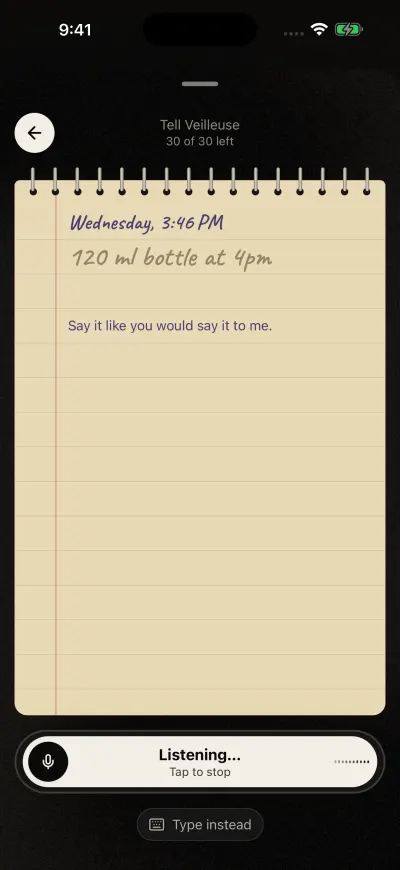
Veilleuse is listening. Talk the way you would to a friend.
3. Check the entries
Each thing you said becomes one entry, with its picture.
- To change one, tap the pencil on its right. Its page opens, with one row for each answer. Tap a row, change it, then tap Save: you come back to the page.
- To leave one out, tap it. A line crosses it out. It will not be saved. Tap it again to bring it back.
- An entry with a dashed outline needs something, for example Missing: how long. Tap its pencil and fill it in.
- To add more, tap the round microphone at the bottom and speak again.
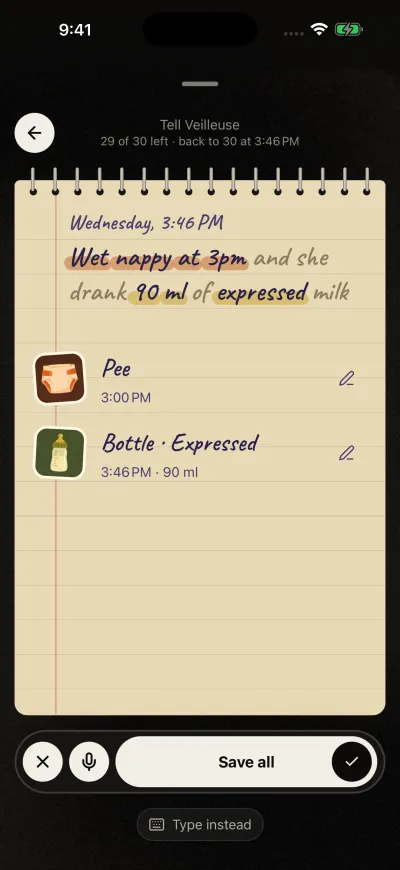
Check what it understood, then tap the tick to save all.
4. Save
Tap Save all, the long button at the bottom. If you crossed some out, it says how many it will save. A seal is pressed on the page, then Saved., and the page closes.
The round X at the bottom left cancels everything. Nothing is saved.
Type instead
Tap Type instead under the bar. Type what happened, then tap the bar or Return to send it. Talk instead goes back to the microphone.
While a timer runs
The + still opens this page. Say "she woke up" or "done feeding": an entry shows when it stopped. Save it, and the timer stops at that time.
Started earlier, still going
Say when a sleep, a breastfeed or pumping started, with no end, for example "she fell asleep 20 minutes ago". Veilleuse starts the timer from then, and it keeps running until you stop it. Said as over, such as "she slept for an hour", it is a sleep that is over.
Several babies
With more than one baby, each entry says who it is for, under it. Tap the names to change them. If you did not say a name, Save all asks who it was for, entry by entry.
Your voice
Your phone, or Apple's speech service, turns your voice into text. We never receive the sound. The text is sent to our server to be turned into entries, and it is not kept.
Each sentence counts as one request. See Ask your diary a question for the daily number.