The little crown under your name tells you where you stand.
Short answer
Tap Settings. Under your name and email, a crown shows your status. Tap Subscription for more.
Veilleuse is for iPhone.
Open it
- Tap Baby at the bottom right of the screen.
- The same button now shows a gear. Tap it to open Settings.
- Look under your name and your email. A small crown shows your status.
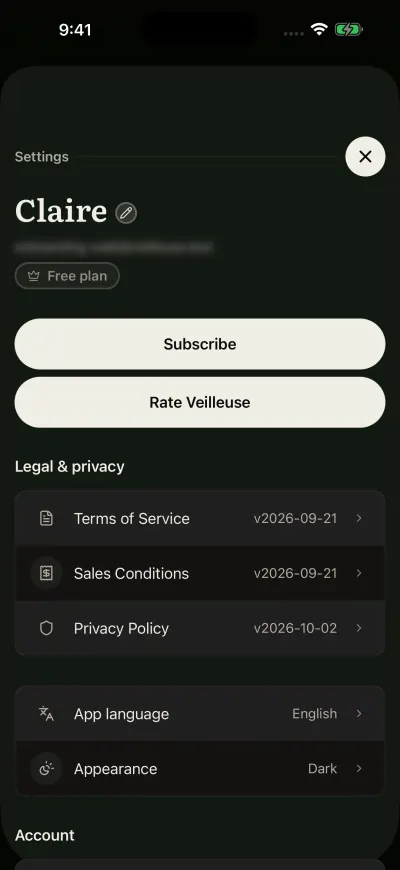
Settings. Your plan shows under your email.
What the status means
- Premium active: your Family plan is running, also during a first month at half price.
- Free plan: this account does not pay. You log one baby by hand for free. If you joined a family with an invite code, this is normal. The family owner's subscription covers you.
- Status unavailable: Veilleuse could not check right now.
More detail
Under your name, tap the big button.
- When you pay, it says Subscription. A message opens: Your Premium subscription is active. To check renewal or cancel, use the store account you subscribed with. It also lists the steps to cancel. Follow the line that starts with Apple.
- When you do not pay, it says Subscribe, and it opens the plans screen.
The renewal date is in your iPhone Settings: tap your name, then Subscriptions.
If it says Status unavailable
The message reads: We cannot confirm your subscription status right now. Check your connection and try again shortly. You can always check billing in the store account you subscribed with.
- Check that your iPhone has Wi-Fi or mobile data.
- Close Settings with the round cross at the top right.
- Wait a moment, then open Settings again.
Nothing is lost. Your subscription is safe with Apple while the app cannot reach us.
Did this fix it?No, ask us