Deleting is for good. Do two things first: cancel the subscription, and export the diary if you want to keep it.
Short answer
Tap Settings, scroll to the bottom, tap Delete Account, then confirm. Cancel your subscription in iPhone Settings first: deleting does not stop the payments.
Veilleuse is for iPhone.
Before you start
- Deleting your account does not stop the payments. Cancel the subscription in your iPhone Settings first. See Cancel your subscription.
- Want to keep the diary? Export it first: tap Baby, scroll down, then tap Export to a spreadsheet.
What it removes
- Your account: your email, your name and your sign-in.
- If you are the family Owner: the whole family. Every baby and every entry are deleted, for everyone. The carers keep their own accounts, but the diary is gone for them too.
- If you are a Carer: you leave the family, and the entries you logged are deleted from the diary. The rest of the family stays.
Our Privacy Policy says your data is deleted from our systems within 30 days.
Only want to stop paying? Cancel the subscription instead. Your diary stays saved.
Delete it
- Open Settings: tap Baby at the bottom right, then the gear in the same place.
- Scroll to the bottom, to Account.
- Tap Delete Account, in red.
- A message says: This permanently deletes your account and all your data. This cannot be undone.
- To go on, tap Delete Account in the message. To stop, tap the other button.
- Veilleuse signs you out. Your account is deleted.
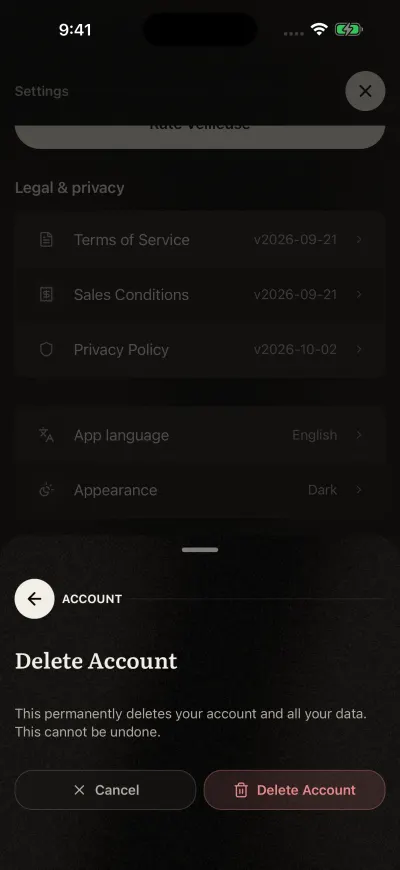
Tap Delete Account in the message only if you are sure.
If it does not work
If you see Could not delete your account. Please try again., your account is still there. Check your Wi-Fi or mobile data, then try again from step 3.
Did this fix it?No, ask us