
One file, one line per entry, that you can keep, print or send to your doctor.
Short answer
Tap the round Baby button at the bottom right, scroll down and tap Export to a spreadsheet. Then choose where to save or send the file.
Veilleuse is for iPhone.
1. Export
- Tap the round Baby button at the bottom right of the screen. Your baby’s page opens.
- Scroll down to the section named after your baby, with Import from another app and Export to a spreadsheet.
- Tap Export to a spreadsheet.
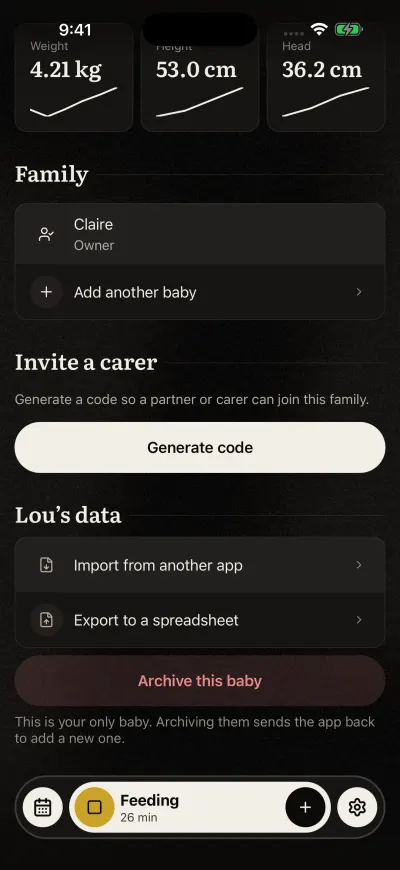
Import and export are under the baby's data.
With one baby, the file is made at once. While it is made, the line says Preparing.
With several babies, Veilleuse asks first. Tap the button with your baby’s name to export only this baby, or Every baby. Every baby means every baby that is not archived.
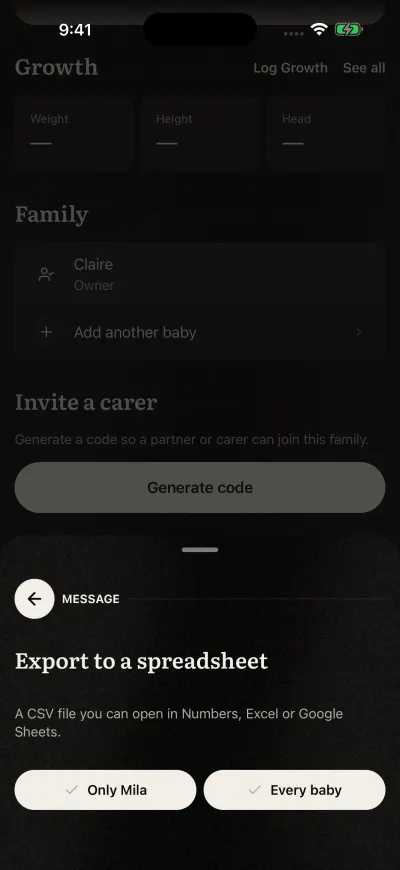
One baby, or all of them.
2. Save or send the file
Your iPhone then shows where the file can go.
- Tap Save to Files to keep it on your iPhone.
- Or pick Mail, Messages or another app to send it.
Apple’s page: Find files on your iPhone or iPad.
3. Open it
It is a CSV file. You can open it in Numbers, Excel or Google Sheets. Each line is one entry, in order of time, with the baby’s name, its type and who logged it. Every kind is in it, tooth brushing included. The column names and the types are in English, whatever the language of your app.
Every carer in the family can export, on every plan.
If it does not work
Could not export your data. Please try again. Check that your phone has internet, then tap Export to a spreadsheet again.