
Every mix and playlist on your phone, with its sounds, its size and what to do when one is missing.
Short answer
Tap Library, then Downloaded, then Manage downloads. Tap a mix to see its sounds. A round arrow retries a sound. Delete removes the whole mix from your phone.
Open the screen
The Downloads screen opens by itself each time you start a download. To open it later:
- Tap Library in the bar on the left.
- Tap Downloaded at the top.
- Tap Manage downloads at the bottom of the list.
To close it, tap the arrow at the top left.
What you see
At the top: how many sounds are on this phone, and how much space they take.
Below: one row per mix or playlist you downloaded. Under each name you see how many sounds are done, the size, and how many failed, if any.
Tap a row to see its sounds. You see each sound, with a coloured dot and a word:
- Available offline The sound is on your phone.
- Waiting to download It waits its turn. Sounds download two at a time.
- A percentage: it is arriving now.
- Download failed It did not arrive. See below.
- Premium required Downloads need the subscription. Tap the lock to see it.
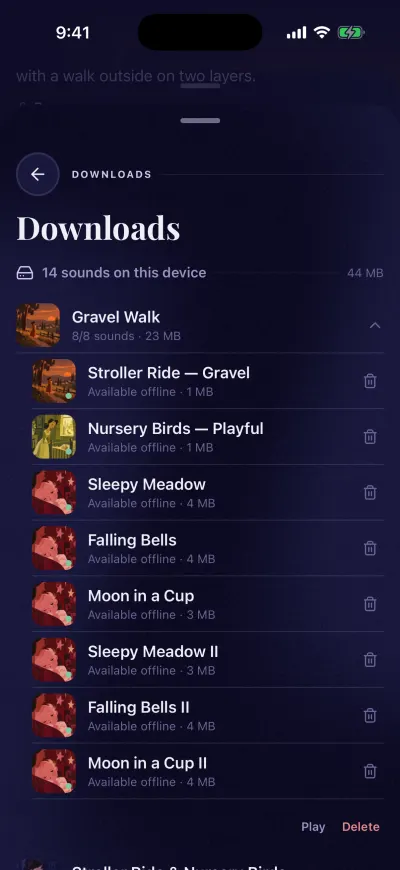
Each sound says Available offline when it is ready.
Retry a download that failed
The app already tried each sound twice. To try again, connect to Wi-Fi or mobile data, then do one of these:
- Tap the round arrow on the right of the sound.
- Tap the mix to see its sounds, then tap Retry failed under them.
- Tap Retry all failed at the bottom of the screen, to retry every mix at once.
Nothing you already downloaded is lost.
Play from this screen
Tap a mix or a playlist to see its sounds, then tap Play under them. The button shows only when every sound is on your phone.
Delete downloads
To remove a whole mix or playlist:
- Tap it to see its sounds.
- Tap Delete, in red, under them.
- The app asks Remove downloads Tap Delete to confirm.
To remove one sound only, tap the bin on the right of that sound.
Deleting a download frees space on your phone. Your saved mixes stay in your library, and you can download them again later.
Nothing here?
If the screen says Nothing downloaded yet, there are no downloads on this phone yet. Open a mix and tap Download all.