
Download once with a connection. After that, the mix plays anywhere, even in flight mode.
Short answer
Open the mix, then tap Download all above the list of sounds. The Downloads screen opens and shows each sound arriving. When every sound says Available offline, the mix plays with no connection.
Before you start
Downloads are part of the subscription. Without it, you see a small lock instead of the download arrow. Tapping the lock opens the subscription screen.
Download with Wi-Fi if you can. Sounds and music take space and data.
Download a mix
- Tap the mix to open it.
- Scroll down to the list of sounds and music.
- Tap Download all, with the arrow pointing down, on the right above the list.
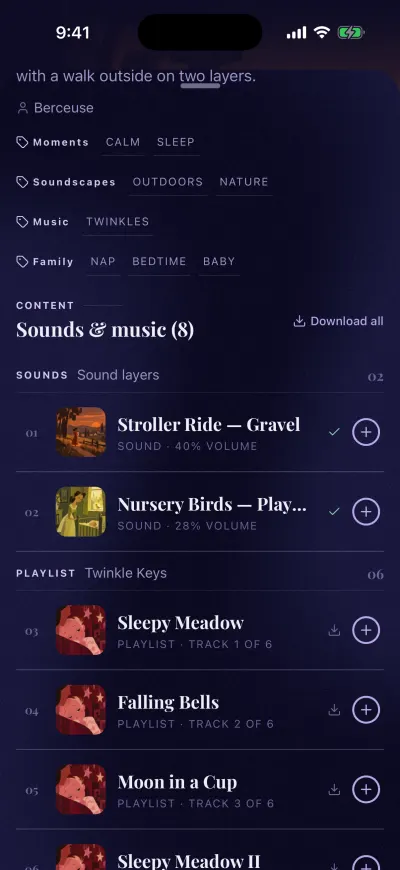
Download all puts the whole mix on your phone.
The Downloads screen opens by itself. Each sound shows Waiting to download, then a percentage while it arrives, then Available offline. The mix plays offline only when every one of its sounds is downloaded.
Download from a list
In a list of mixes or playlists (on Home, in search, in Library), each row has a small arrow pointing down on the right, next to the + button. Tap that arrow to download the whole mix or playlist.
Download a playlist
- Tap the playlist to open it.
- Tap Download all above its list of tracks.
The Downloads screen opens and shows each track arriving.
Mixes you save are downloaded for you
When you save a mix of your own, Berceuse downloads its sounds right away. You don't need to do anything else. You can follow it on the Downloads screen.
Play it with no connection
Open the mix as usual and press play. You can also play it from your downloads:
- Tap Library in the bar on the left.
- Tap Downloaded at the top.
- Tap Manage downloads at the bottom.
- Tap the mix to see its sounds, then tap Play.
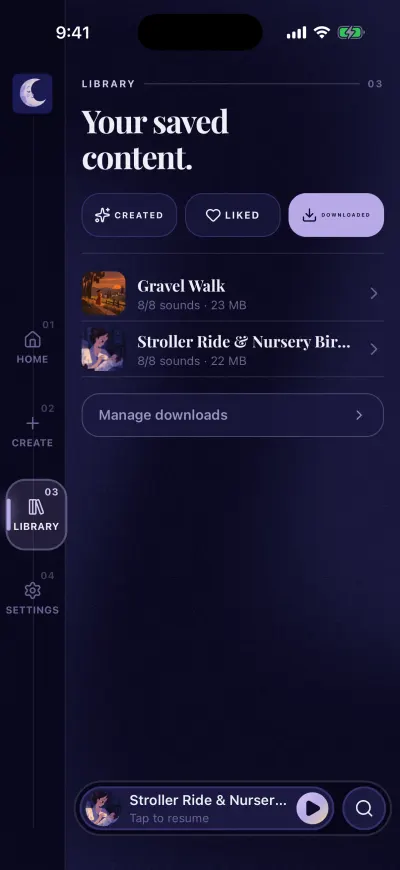
Downloaded mixes play with no internet.
If a message appears
- Could not download mix or Could not download playlist The app could not get the list of sounds. Check that you have Wi-Fi or mobile data, then tap the arrow again.
- Download everything in this mix to play it offline. Some sounds of this mix are not on your phone yet. Connect, open the mix, and tap Download all again.
- Nothing downloaded yet You have no downloads on this phone yet. Follow the steps above.