Each kind has its own card on Home. Its + asks a few short questions, one per page. Tap your answer, then the button at the bottom.
Short answer
On Home, find the card for what happened (Feed, Nappy...). Tap the round + on the right of its coloured band. Tap an answer on each page, then Next, and Save on the last one.
Veilleuse is for iPhone.
Where to start
Home shows one card for each kind of entry: Sleep, Feed, Nappy, Pumping, Bath, Tooth brushing, Growth and Medication. Scroll down to see them all.
- Find the card for what happened.
- Tap the round + on the right of its coloured band.
- A page slides up with one question. Tap your answer, then the button at the bottom.
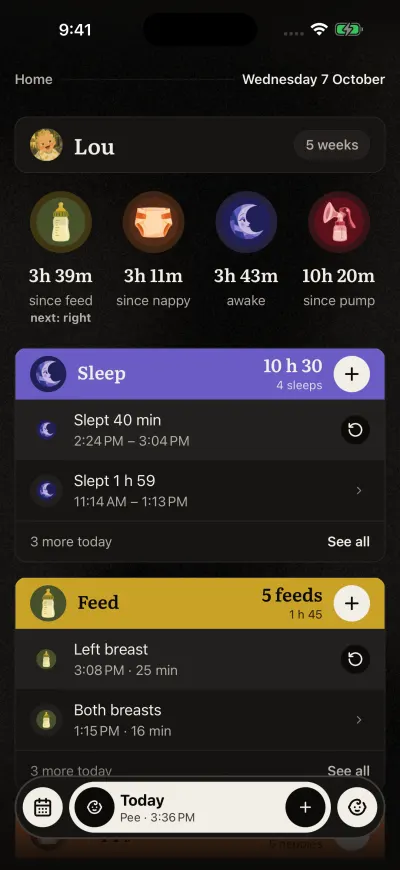
Home. The bar at the bottom stays on every screen.
Tapping an answer only ticks it. The button moves you on: Next, then Save on the last page. At the top, a small count such as 1 of 3 shows where you are. The arrow at the top left goes back one page. On the first page, it closes without saving.
The round pictures at the top of Home (since the last feed, since the last nappy...) open the same pages when you tap them.
A sleep
The first page asks if your baby is asleep now.
- Asleep now is ticked first. Tap Next. The next page asks when your baby fell asleep, with Just now ticked. Tap Start now. The timer starts and the page closes.
- Already woke up: tap the second answer, then Next. Choose when your baby fell asleep, then when they woke up. The page shows how long it was. Tap Save.
A feed
The first page asks how: Breast, Bottle or Solids.
- Breast: tap a side (Left, Right or Both), then Next. Then Feeding now, Next, a time, and Start now starts a timer. For a feed that is over, tap Already done: you then choose when it ended and how long it took.
- Bottle: tap Formula, Expressed milk or Mixed. Type how much your baby drank. Choose when, then tap Save.
- Solids: tap the foods your baby ate, then how much of each and if she liked it (you can skip both), then when. See Log solids with the food list.
A nappy
Tap Pee, Poo, Pee and poo or Dry, then Next. The page asks When? Just now is ticked first. Tap Save.
Pumping
Tap a side, then Next. Pumping now, Next, a time, and Start now start a timer. The amount comes after: when you stop the timer, Veilleuse asks how much.
For a pump that is over, tap Already done. Type the amount, for both sides together or Different for each side, then choose when you finished and how long it took.
A bath or tooth brushing
The page asks When was the bath? or When were the teeth brushed? Tap a time, then Save. Each is one moment. It has no timer. To add a note, open it after saving. See Log tooth brushing.
Growth
Type the Weight, the Height or the Head size. One of them is enough. Leave the others on Not measured. Then choose the day and tap Save. You can also add a measure from the baby screen: tap Baby at the bottom right, then the button beside Growth.
If a number looks too low or too high for a baby, a line under it says so and gives the range to use.
Medicine
Tap Medicine or Vaccine. Type the name. For a medicine, also type how much (for example 5 ml). Choose when, then tap Save. For a vaccine, you choose the day.
The button stays grey
The button at the bottom only works once the page has its answer. A line above it says what is missing, for example: add the amount to save. Tap your answer or type it, and the button wakes up.
| Entry | What it needs |
|---|---|
| Breast | A side |
| Bottle | What was in the bottle, and an amount above 0 |
| Solids | At least one food |
| Nappy | Pee, poo, both or dry |
| Pumping | A side, and for a pump that is over, the amount |
| Growth | At least one measure that looks right for a baby |
| Medication | A name, and for a medicine, how much |
| An end time | After the start time |
Several babies
If your family has more than one baby, saving asks who it was for. Tick the babies, then tap the button at the bottom of that page. Each baby gets their own entry. Pumping never asks: it stays with the baby shown.
If it does not save
If you see No baby selected, the app does not know which baby you are logging for. Close the page, go back to Home, and try again. If you see We could not save that entry. Please try again., the page stays open: tap the button again. Nothing is saved twice.
On the Free plan, you log one baby. If a baby needs the Family plan, the plans screen opens instead.