
Three days free, then the plan you picked. Cancel before the end and you pay nothing.
Short answer
Open the subscription screen, pick Monthly or Yearly, tap Start free trial, then confirm in Apple’s or Google’s window.
What it costs
Three days free. Then $5.99 a month or $39.99 a year (US prices). The app shows the price in your currency. Nothing is charged on the day you start.
1. Open the subscription screen
- Tap Settings in the bar on the left.
- Tap Subscribe, the big button under your name.
You can also tap anything locked, like a small lock or Premium in the bar. The first time you use Berceuse, this screen comes by itself after your first mix.
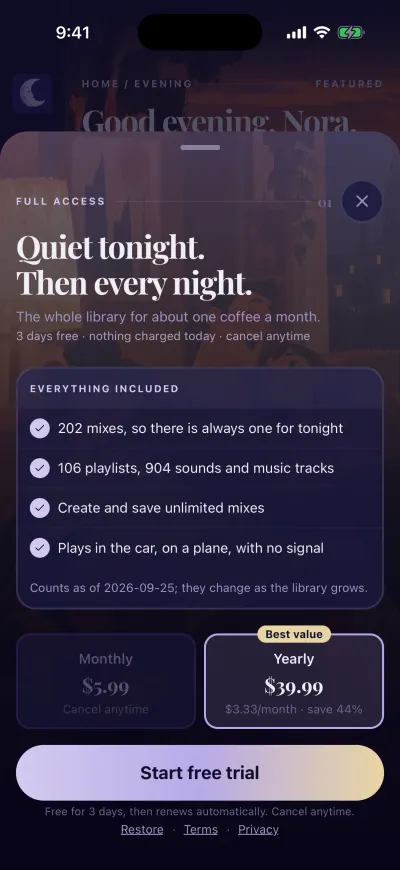
The subscription screen.
2. Pick a plan
Tap Monthly or Yearly. The plan you picked has a coloured frame. Yearly is picked when the screen opens.
3. Start the trial
Tap Start free trial at the bottom of the screen.
On iPhone
- Apple’s window opens at the bottom of the screen. It shows the plan, the price and the free trial.
- Confirm with Face ID, Touch ID or your Apple Account password.
To stop it later, Apple’s own page: Cancel a subscription from Apple.
On Android
- Google Play’s window opens at the bottom of the screen. It shows the plan, the price and the free trial.
- Tap the button in that window to confirm.
Google’s own page: Subscriptions on Google Play.
When it is done, the subscription screen closes. You are back where you were, and everything is unlocked. During the first screens, your first mix is saved and the mixer opens.
If you close Apple’s or Google’s window without confirming, nothing happens.
If the button says Subscribe
The button says Subscribe when the store does not offer you the free trial, for example because you already had it with this Apple or Google account. Then the line under the title says Cancel anytime, and the payment starts the day you confirm.
If a message appears
Could not start purchase Check your connection and signed-in account, then try again.
- Check that Wi-Fi or mobile data is on.
- Check that you are signed in to the App Store (iPhone) or Google Play (Android).
- Tap the big button again.
If the big button now says Finish activation, your payment went through. Tap it.
Stop before you pay
To pay nothing, cancel the trial in the store before it ends. On iPhone, Apple asks you to cancel at least 24 hours before the trial ends. You keep Premium until the end of the three days.