Home is where you pick something to play. Everything on it opens with one tap.
Short answer
Tap Home, the first button in the bar on the left. Tap any picture to open it. Slide a row to the left to see more.
Where Home is
Tap Home. It is the first button in the bar on the left of the screen.
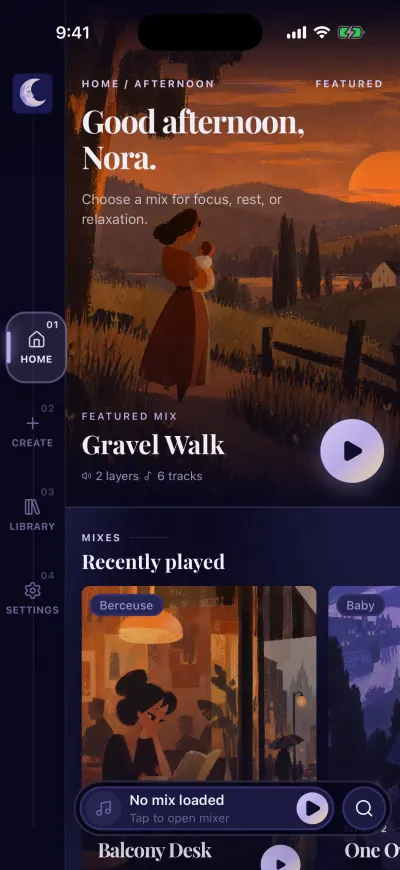
Home. The bar on the left takes you everywhere.
The big picture at the top
At the top, the app greets you and shows one mix: Featured mix. Under its name you see how many sounds and music tracks it has. A small heart means you liked it.
Tap the picture. The page of that mix opens and a short preview plays.
The rows
Under it, Home shows rows. The app chooses their order, so it can change from day to day. You may see:
- Recently played: the mixes you played last.
- For now: mixes for this time of day.
- Trending and Top mixes: what other people play the most.
- Top playlists: music playlists.
- Rows of tags: Moments, Soundscapes, Music and Family.
- Content packs: collections of mixes and playlists.
A row shows more than fits on the screen. Put your finger on a picture and slide it to the left to see the next ones.
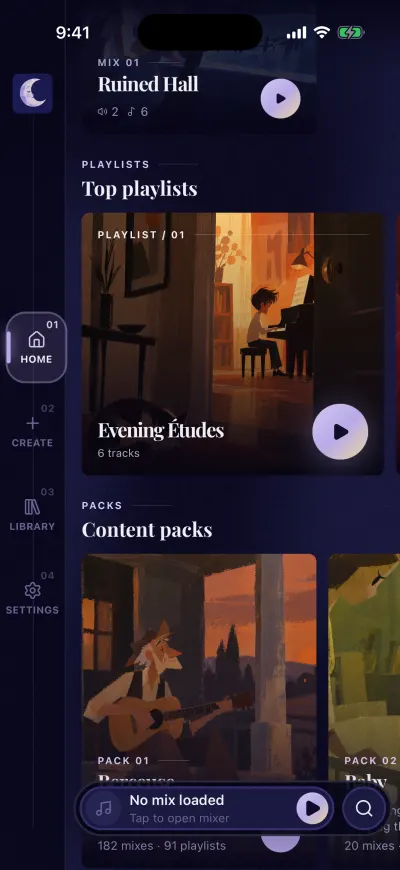
Scroll down for playlists and packs.
What each picture does
- A mix (MIX): tap it to open its page.
- A playlist (PLAYLIST): tap the picture to see its tracks. Tap the round play button on the card to put it in the mixer.
- A tag: tap it to see everything with that tag.
- A pack (PACK): tap it to see the mixes and playlists inside.
A window about a new pack
When a new pack arrives, a window shows it once, over Home. It says NEW PACK.
- Tap Take a look to open the pack.
- Tap Not now to close it. The pack stays on Home, in Content packs.
If there are several new packs, slide the card to the left to see the next one. Dismiss all closes them all.
The bar at the bottom
At the bottom of the screen, a long bar shows what is in the mixer, with a round play button and a magnifying glass on the right. See how to play a mix or a playlist.