A mix plays from its page. A playlist goes into the mixer, then you press play.
Short answer
Tap a mix, then tap the round play button on its picture. For a playlist, tap its play button, then tap the big round play button at the bottom of the mixer.
Play a mix
- Tap the picture of a mix, on Home, on a tag, in a search or in your Library.
- The mix page opens. A short preview starts by itself.
- Tap the round play button on the right, at the bottom edge of the big picture.
- The mixer opens and the whole mix plays.
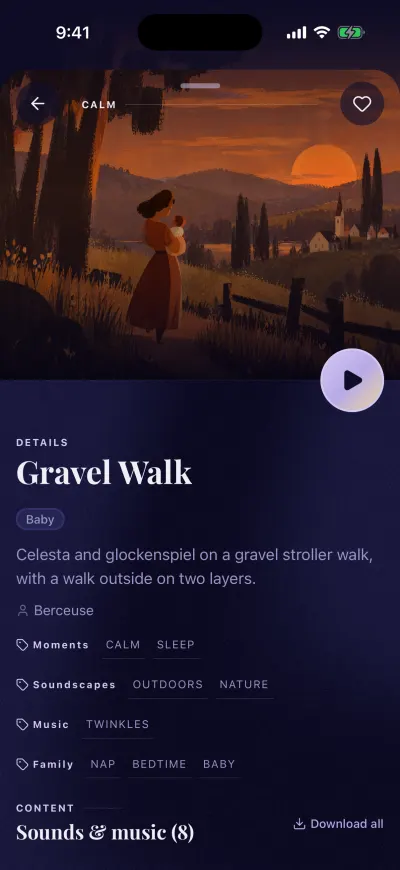
A mix page. The round button plays it.
The preview stops after a few seconds. That is normal. The round play button plays the whole mix.
Without a subscription, the round play button opens the subscription screen instead.
Play a playlist
- On Home, find a playlist in Top playlists.
- Tap the round play button on the card.
- The mixer opens, with the playlist at the end of the list. Nothing plays yet.
- Tap the big round play button at the bottom of the mixer.
You can also tap the picture of the playlist to open its page, then tap Add this playlist to mix.
The playlist joins the sounds already in the mixer. It replaces the music that was there before.
The bar at the bottom of the screen
On Home, Create, Library and Settings, a long bar sits at the bottom of the screen.
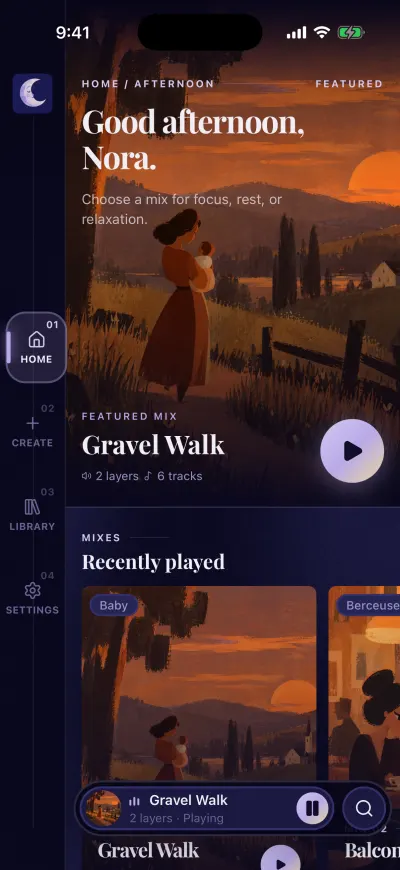
The bar at the bottom. Tap it to open the mixer.
- Tap the picture or the name on the left: the mixer opens.
- Tap the round button: the sound plays or pauses.
- Tap the magnifying glass on the right: search opens.
When the mixer is empty, the bar says No mix loaded.
Play last night's mix again
When you open the app again, the bar shows your last mix with Tap to resume.
- Tap the round play button in the bar. The mix plays.
- Or tap the name. The mix plays and the mixer opens.
If you have no internet and this mix is not downloaded, the app says Can't play offline. Connect to Wi-Fi or mobile data, then try again.
Play from a list
In search and in your Library, each mix has a + on the right of its line. Tap + to play that mix right away. It replaces what was in the mixer.