Each mix and playlist has its own page. It tells you what is inside and lets you play it.
Short answer
Tap a mix or a playlist to open its page. A short preview plays. Tap a line to hear that sound alone, or the + to add it to your mixer.
Open a page
Tap the picture of a mix or a playlist: on Home, on a tag, in a search or in your Library. Its page opens from the bottom.
A short preview starts by itself. If something was playing, it pauses, then starts again when you leave the page.
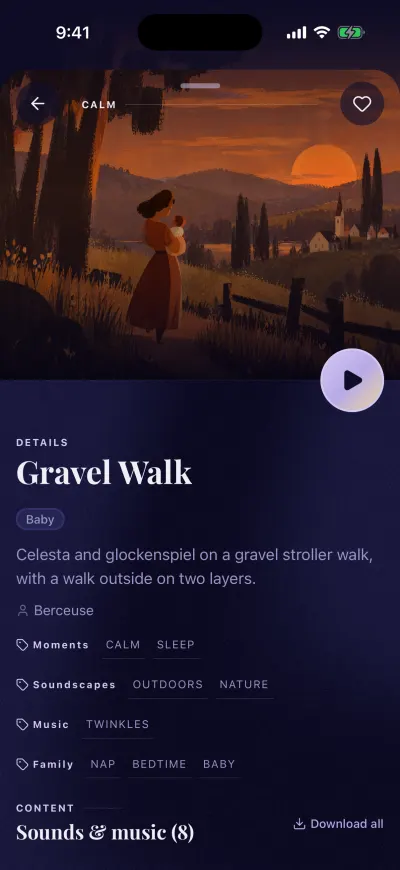
A mix page. The round button plays it.
The page of a mix
- The arrow at the top left closes the page.
- The heart at the top right adds it to Liked.
- The round play button, on the right at the bottom of the picture, plays the whole mix.
- DETAILS: the name, a few words about it, who made it and its tags.
- Sound layers: each sound, with the volume it has in this mix.
- Then the music of the mix, track by track.
Tap a line to hear only that sound. Tap the + on its right to add it to your mixer. A tick shows it is in.
Next to the title of the list, Download all keeps the whole mix on your phone.
The page of a playlist
- The heart at the top right adds it to Liked.
- Add this playlist to mix puts the playlist in your mixer. Then tap the big round play button at the bottom of the mixer.
- The list of tracks. Tap a line to hear a preview. Tap the + to add only that track.
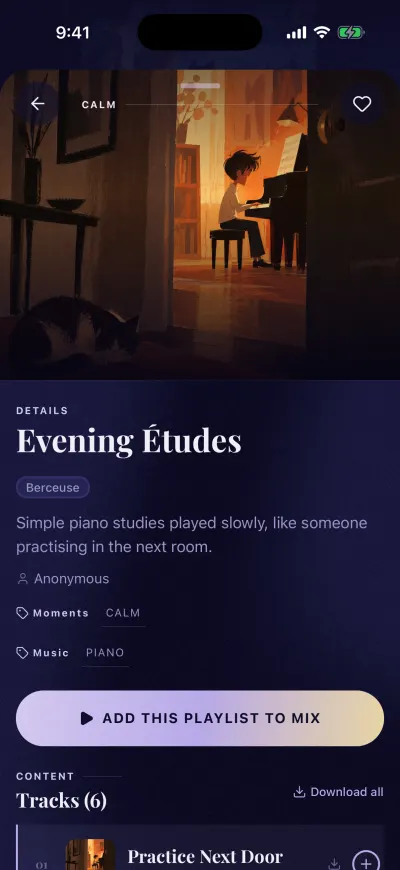
Add the playlist to the mix that is playing.
Your own mixes
On a mix you made, there is no heart: it is already in Created. You can change its name, and the button Delete Mix is at the bottom of the page. See rename a mix and delete a mix.
If a message appears
- Mix not found or Playlist not found: this mix or playlist no longer exists, or it was deleted. Close the page with the arrow at the top left.
- Could not load tracks or Could not load sounds: Check your connection and try again. Check your Wi-Fi or mobile data, then tap Retry.