
A tag gathers everything about one theme. A pack is a set of mixes and playlists made together.
Short answer
On Home, tap a tag picture or a pack. Tap a mix or a playlist to open it. On a tag page, tap a sound to hear it and the + to add it.
Open a tag page
On Home, scroll down to the rows of tags: Moments, Soundscapes, Music or Family. Tap a tag picture.
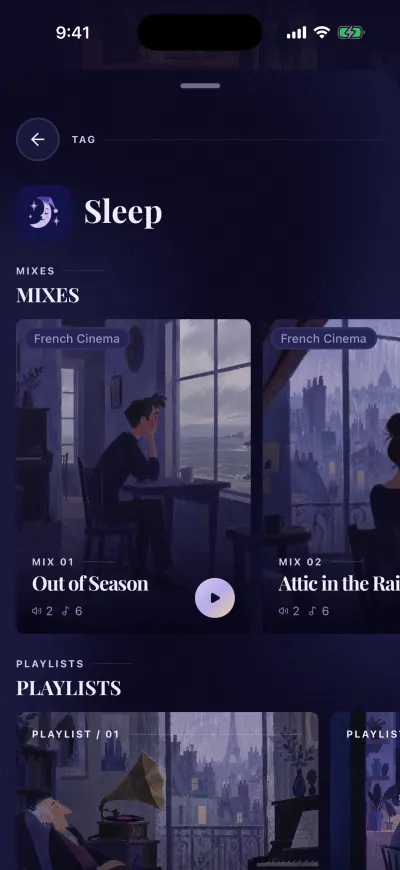
Everything for one moment, like Sleep.
What a tag page shows
- At the top, the name of the tag and its icon.
- MIXES: the mixes with this tag. Slide the row to the left to see more. Tap one to open its page.
- The playlists with this tag. Tap one to see its tracks.
- Tracks: each sound and music track with this tag. Tap a line to hear a preview. Tap the + on the right to add it to your mixer.
At the very bottom, ITEMS LOADED shows how many things the page holds.
To leave, tap the arrow at the top left. You can also pull the small bar at the top down.
Open a pack
On Home, find the row Content packs. Each card says PACK and how many mixes and playlists are inside. Tap it.
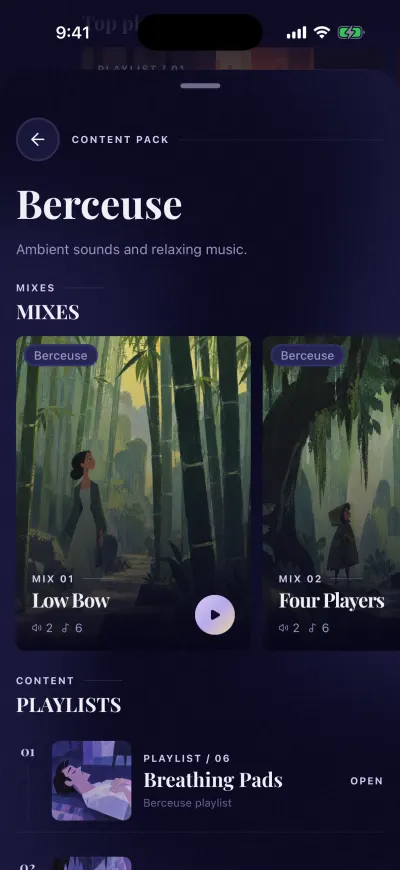
A pack groups mixes and playlists.
What a pack shows
- The name of the pack and a few words about it.
- MIXES: the mixes of the pack. Tap one to open its page.
- PLAYLISTS: the playlists of the pack. Tap one to see its tracks.
The page ends with END OF PACK.
The new pack window
When a new pack arrives, a window says NEW PACK over Home. It shows only once.
- Take a look opens the pack.
- Not now closes the window. You find the pack later in Content packs.