Home is a list of rows. A row that has nothing in it is left out, so yours may show fewer than someone else's.
Short answer
Home shows Continue watching, New from your channels, Shorts and For you, in that order. Tap a video to watch it.
SkipTube is for iPhone.
The rows, in order
Home is the first tab. Scroll down to see its rows. They always come in this order.
- Continue watching: videos you started and did not finish. Each one has a thin line for how far you got, and how many minutes are left.
- New from your channels: the newest videos from your channels. The three newest show here.
- Shorts: short, tall videos. This row only shows when the Shorts setting is on Show.
- For you: videos YouTube suggests for you.
A row with nothing in it is not shown. On a new phone with no account, you may only see For you, or the box that asks you to search.
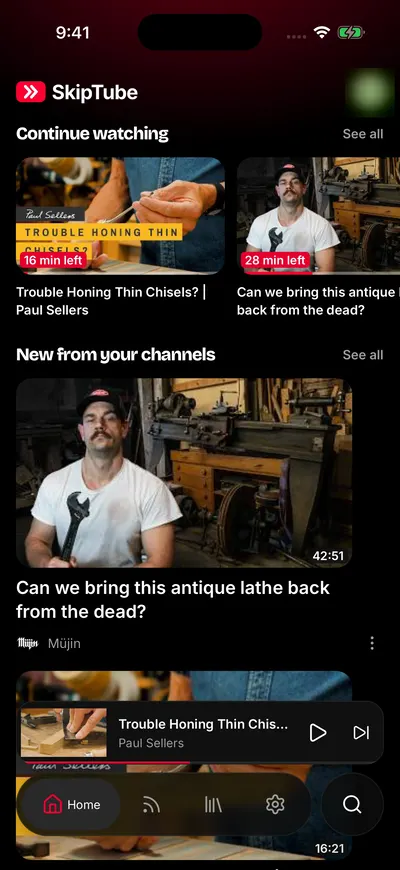
Home, signed in to YouTube.
Where each row comes from
- Continue watching comes from your SkipTube history. It needs a SkipTube account, because that is where your history is kept.
- New from your channels comes from your YouTube subscriptions when you are signed in to YouTube. When you are not, it comes from the channels you follow in SkipTube.
- For you is YouTube's own home feed. It needs you to be signed in to YouTube.
Videos from channels you blocked are left out of every row. See The video menu.
Open a video, a channel or a menu
- Tap a video to open it on the Watch screen. A tap on the picture or the title does the same.
- Tap the channel name or its picture under a card to open that channel.
- Tap the more button at the right of a card, or press and hold the card, to open the video's menu.
See all
Continue watching and New from your channels show a See all link when there is more than the row holds. Tap it to go to the full list. Continue watching opens Library. New from your channels opens Subscriptions.
When For you asks you to search
If YouTube gives no videos, For you is replaced by a box called Find something to watch. Signed out of YouTube, it says: Sign in to YouTube to see your recommendations here, or search for a video.
The box has two buttons:
- Search opens search.
- Sign in to YouTube opens Google's sign-in page. This button only shows while you are signed out of YouTube.
You can use SkipTube without signing in. Search works the same way signed out. See Search videos and channels.
Signed in, the same box says Nothing to recommend yet. Search for a video to get started.
At the bottom of the list
When you scroll near the end, SkipTube loads more videos. If that fails, a line says Could not load more with a Try again button. Tap it to try again. Nothing you saw is lost.
Focus mode
If Focus mode is on in Settings, Home shows no rows. It shows one line that says so, and a Search button. Turn Focus mode off to get the rows back.