Three buttons at the top: what you made, what you liked, what is on your phone.
Short answer
Tap Library in the bar on the left. Then tap Created, Liked or Downloaded at the top.
Open your Library
Tap Library, the third button in the bar on the left of the screen.
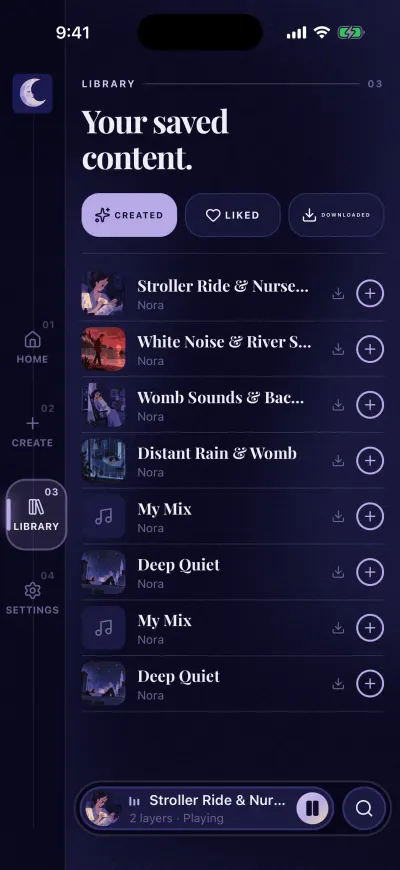
Library. Created, Liked and Downloaded at the top.
Without a subscription, that button says Premium, with a crown. It opens the subscription screen.
The three buttons at the top
- Created: the mixes you made, with Create or with Save in the mixer.
- Liked: the mixes and playlists you liked with the heart.
- Downloaded: what is saved on this phone to play without internet.
Tap one. The list under it changes.
Each line
- Tap the line to open the page of that mix or playlist.
- On a mix, the + on the right plays it right away.
- On a playlist, the + puts it in your mixer.
- The arrow pointing down downloads it.
More than 10 lines
Each page shows 10 lines. When there are more, arrows appear at the bottom of the list. Tap the arrow on the right to see the next page.
The downloaded part
Each line is a mix or a playlist on your phone. It shows how many sounds are ready and the size. Tap a line to see its sounds in your downloads. At the bottom, Manage downloads opens all your downloads.
If a line says that some sounds failed, they did not finish downloading. Open Manage downloads and try them again.
Empty messages
- Nothing created yet. You have not made a mix yet. Tap Create to make one.
- Nothing liked yet. Tap the heart on a mix or a playlist you like.
- Nothing downloaded yet. Open a mix and tap the download icon.