
Berceuse speaks English, Spanish, French, Italian, Portuguese and German.
Short answer
Tap Settings, then App language. Tap a language. The app changes right away.
Choose a language
- Tap Settings in the bar on the left. It is the last button.
- Scroll down a little. Tap App language. On its right you see the language in use.
- A panel opens: Choose app language.
- Tap a language. A tick appears, the panel closes and Berceuse changes language right away.
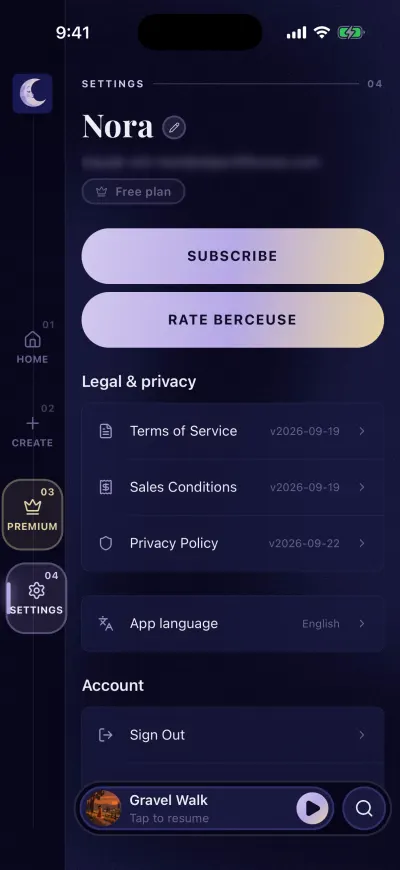
Settings, the last button in the bar on the left.
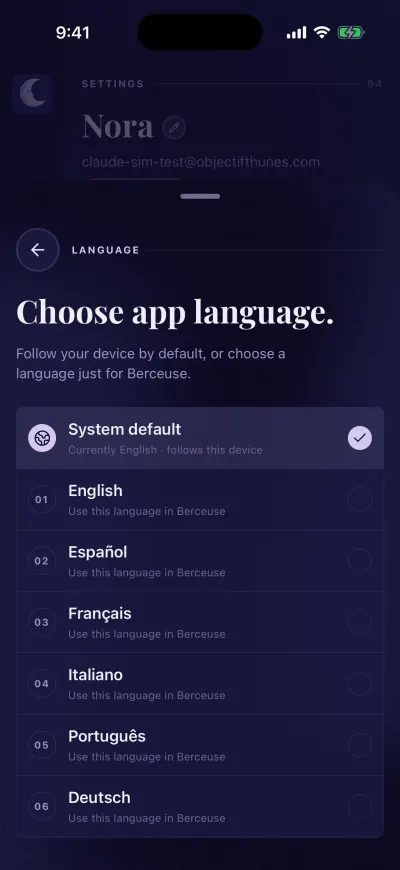
Tap a language. The app changes at once.
The languages are written in their own words: English, Español, Français, Italiano, Português, Deutsch.
Follow your phone
The first choice, System default, uses the language of your phone. If your phone is in a language Berceuse does not have, the app shows English.
What changes
The buttons, the messages and the names of sounds and playlists. The choice is kept on this phone only. On another phone, choose again.
The sign-in screen and the first screens follow the language of your phone, because you can only choose a language once you are in the app.