No need to unlock your phone in the dark. The controls are on the lock screen.
Short answer
While a mix plays, wake the screen without unlocking. On iPhone, tap the round play or pause button on the Berceuse card. On Android, use the Berceuse notification. Tap the card itself to open the mixer.
What you see
As soon as a mix plays, Berceuse puts its controls on the lock screen. They show the name of the mix and the names of its sounds. When music plays, they also show the song.
On iPhone
On iPhone you get two things:
- The Berceuse card. It shows "Now playing" or "Paused", the name of the mix, its sounds, and a round play and pause button on the right. On an iPhone with the Dynamic Island, the same card sits at the top of the screen.
- The iPhone player. Like for any music app, with play and pause. When a playlist plays, it also has previous and next.
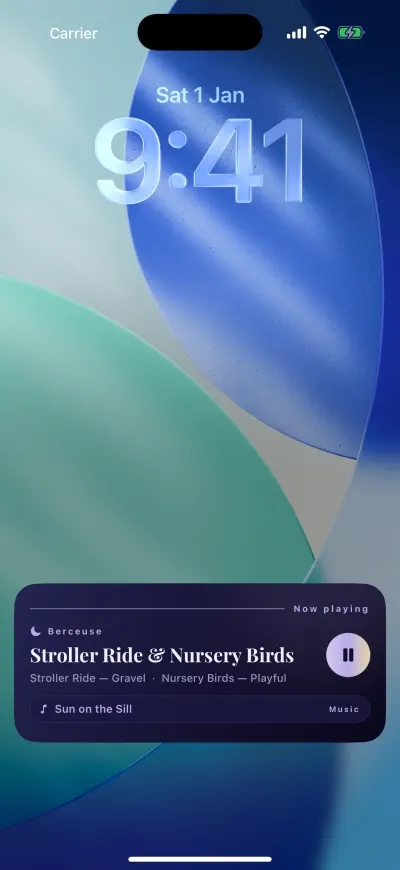
Pause from the lock screen.
To pause, tap the round button on the card. Tap it again to play. Tap anywhere else on the card to open Berceuse on the mixer.
The round button needs iOS 17 or later. You can also pause from Control Center, or with your headphones.
The card is missing? Live Activities must be on for Berceuse. Open the Settings app, tap Apps, tap Berceuse, then tap Live Activities and turn them on.
The card turned grey? iPhone keeps a card for 8 hours at most. The sound keeps playing. Open Berceuse once and the card comes back.
Apple's own page: Access features from the Lock Screen.
On Android
On Android, Berceuse shows a notification while it plays or is paused. You see it on the lock screen and when you slide down from the top of the screen.
- Tap the round button to play or pause.
- When a playlist plays, the arrows on each side go to the previous or the next song.
- Tap the notification itself to open Berceuse.
The notification stays while Berceuse is open, even on pause, so you can always start the sound again. It closes when you close Berceuse from your recent apps.
There is no widget for the home screen
Berceuse has no widget to place on the home screen. Its controls appear by themselves on the lock screen while a mix is loaded.