
Pick a length. The sound fades out gently, then stops.
Short answer
In the mixer, tap Timer on the line above the play button, then pick a length. To turn it off, tap it again, then Off.
Set the timer
- Start your mix, then open the mixer: tap the bar at the bottom of the screen.
- Find the line MASTER OUTPUT, above the big round play button.
- On the right of that line, tap Timer, with the small moon.
- The lengths appear under it: 5, 10, 15 or 30 minutes, or 1 h.
- Tap the one you want.
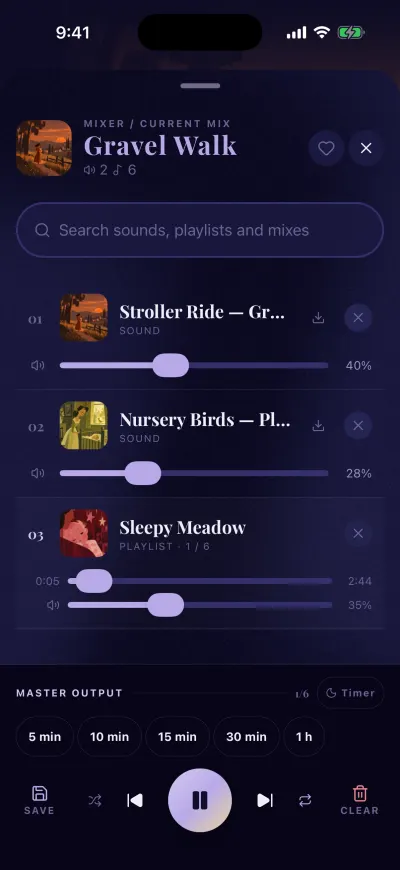
Tap a length. The sound stops by itself.
The button now shows the time left. You can close the mixer and lock your phone.
What happens at the end
In the last 30 seconds, the sound fades out gently. Then it stops. The next time you press play, the volume is back to normal.
Change or turn off the timer
- Tap the time left, on the right of MASTER OUTPUT.
- Tap another length to start again, or tap Off.
The timer button only shows when something is in the mixer.
Did this fix it?No, ask us