
Growth lives on the baby screen, with the newest value and a small line for each.
Short answer
Tap Baby. Under Growth you see the newest weight, height and head. Tap See all for every measure.
Veilleuse is for iPhone.
See the growth
- Tap Baby at the bottom right.
- Under Growth, three boxes show the newest Weight, Height and Head. A small line shows how it changed, once there are two measures.
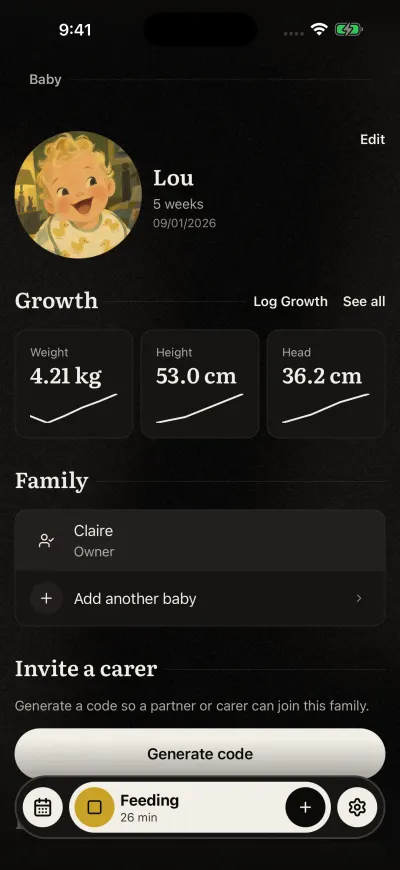
The Baby screen. Edit is at the top right.
A box with a dash has no measure yet.
Add a measure
- On the right of Growth, tap the first link. It asks What did you measure?
- Fill in what you measured: weight, height, head, or only one of them. Then tap Next.
- Choose the day, then tap Save.
You can also tap the + on the Growth card on Home.
See every measure
- Tap See all, on the right of Growth.
- A page slides up with the measures, newest first, each with its date.
- Tap a measure to fix it or delete it.
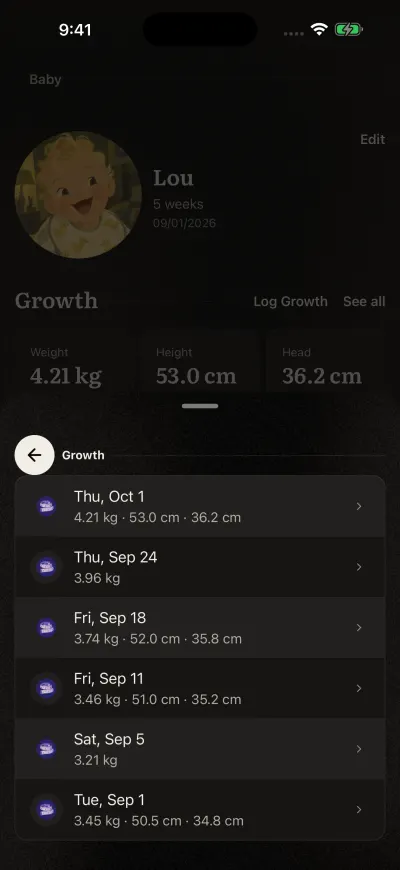
Tap a measure to change it or delete it.
With nothing measured yet, the page says No measurement yet.
Units
Weight, height and head show in kg and cm, or in lb and in. To change, see language, look and units.
Did this fix it?No, ask us