Four switches decide what the player shows. Focus mode goes further and takes the suggestions away from Home. Both are free.
Short answer
Tap Settings, then Clean player or Focus mode. Each switch works as soon as you tap it.
SkipTube is for iPhone.
Open the Clean player
- Tap Settings in the tab bar.
- Under Watching, tap Clean player.
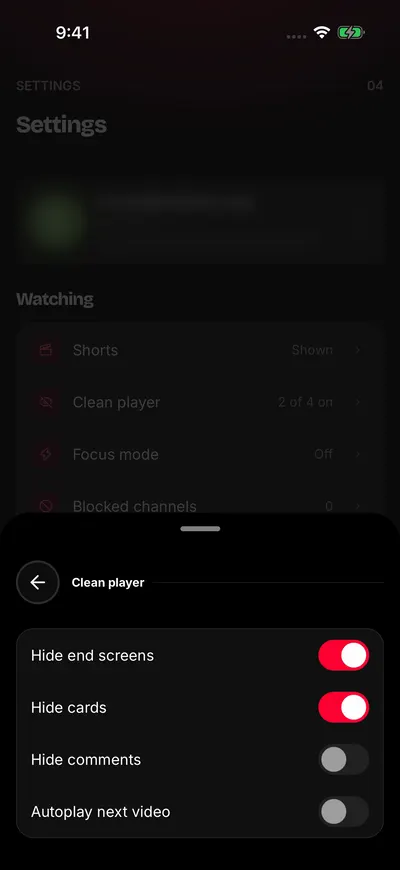
Each switch hides one thing.
There are four switches. Each one changes at once. Nothing else to confirm.
- Hide end screens: hides the boxes YouTube puts on the video at its end. This switch is on at first.
- Hide cards: hides the cards YouTube puts on the video. This switch is on at first.
- Hide comments: leaves the Comments tab out of Details, and the comments button out of the Shorts player. This switch is off at first.
- Autoplay next video: decides what happens when a video ends. This switch is off at first.
What autoplay does
With Autoplay next video on, the next video plays when one ends. If your queue has a video, that one plays. If not, YouTube's next suggestion plays.
With it off, the video stops at the end and shows a button to play it again. It is the same switch as Play suggested videos when the queue ends in the queue. See The queue.
The Clean player is free. With a SkipTube account, your choices follow you to your other phones.
Turn on Focus mode
- Tap Settings in the tab bar.
- Under Watching, tap Focus mode.
- Tap the switch.
The line under it says Search and your channels only.
With Focus mode on, Home shows no rows. It shows one line instead: Focus mode is on: only your channels and search. If you chose to hide Shorts, it says Focus mode is on: only your channels and search. Shorts are hidden.
The Up next list under a video is empty too. See No suggested videos.
What Focus mode keeps
Search and channels still work. Tap the round search button to find a video. Open a channel to see its videos.
Focus mode is free. To go back to normal, turn the switch off. Nothing is lost.