
Signing out does not delete anything. Your account and your mixes wait for you.
Short answer
Tap Settings in the bar on the left. Scroll down to Account. Tap Sign Out, then tap Sign Out again to confirm.
Sign out
- Tap Settings in the bar on the left. It is the last button.
- Scroll down to Account, near the bottom.
- Tap Sign Out.
- A panel opens from the bottom: Are you sure you want to sign out? Tap Sign Out.
- The sign-in screen opens.
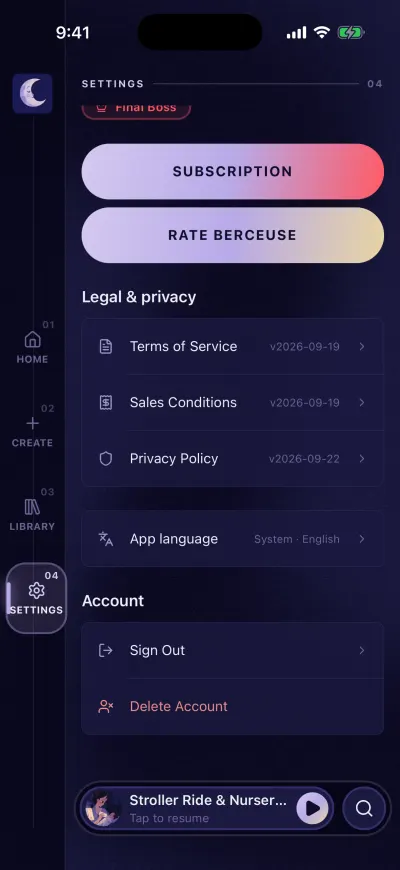
At the bottom: language, sign out and delete.
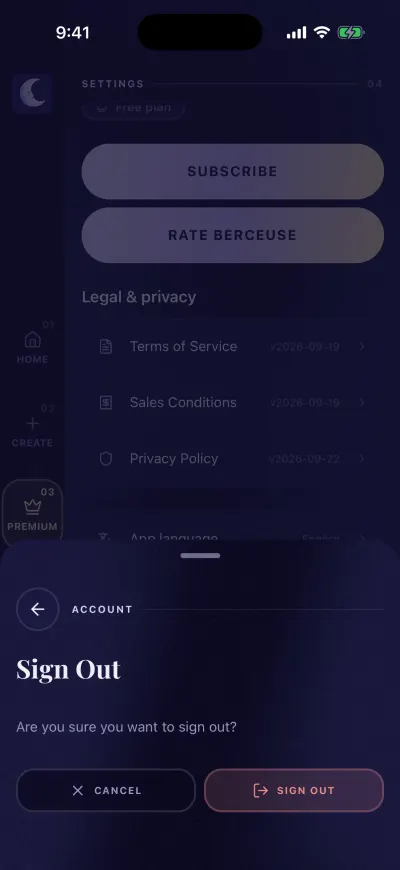
Tap Sign Out in the panel to confirm.
Signing out does not delete your account. Your mixes stay in it. It does not stop your subscription either.
Changed your mind?
To close the panel without signing out, tap the button with a cross. Or slide the panel down by the small bar at its top.
Sign in with another account
Sign out, then use the other email address on the sign-in screen. To come back to the first account, sign out again and use its email.
Did this fix it?No, ask us