
Each person uses their own account on their own phone. Nobody pays twice.
Short answer
Tap the round Baby button at the bottom right, scroll down to Invite a carer, tap Generate code, then Share. The other person taps the link to join.
Veilleuse is for iPhone.
1. Make a code
- Tap the round Baby button at the bottom right of the screen. It shows a small baby. Your baby’s page opens.
- Scroll down. Under Family you see the people in the family. Below them is Invite a carer.
- Tap Generate code.
A code appears. It has 8 letters and numbers, shown in two groups of four. Under it, you see the date it stops working.
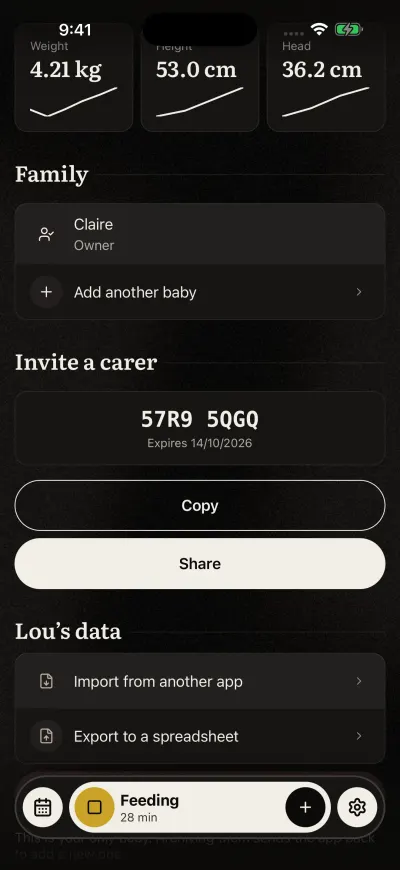
Send the code to your partner or carer.
A code works for 7 days, and only once. Make a new code for each new person.
2. Send it
Two buttons appear under the code.
- Share sends a link to the code. Your iPhone shows the apps you can share with. Pick Messages, WhatsApp or another app, then the person.
- Copy copies the code. You can paste it in a message, or read it out loud to the person next to you.
The space in the middle of the code is there to read it more easily. It is not part of the code.
3. On their phone
They install Veilleuse and sign in with their own account. Then they tap the link, or type the code on the screen about the baby. Their steps are in the guide to join a family, below.
Tell them not to add the baby on their phone. If they do, they start a second diary and can’t join yours.
Once they join, they see the same baby, the same day and the same week.
Who can invite
Everyone in the family can make a code: the owner and the carers.
One Family plan covers 3 babies and 3 carers. You count as one of the 3, so you can invite 2 more people.
Inviting needs the Family plan. On the Free plan, Generate code opens the plans screen.
If it does not work
- We could not create an invite. Please try again. Check that your phone has internet, then tap Generate code again.
- Your family is full The family already has 3 people, you included. The owner can remove someone first.
- You tap Generate code again and get the same code? That is normal. While a code is valid and unused, Veilleuse shows it again. A new code comes once the old one has been used or is more than 7 days old.